
A team has 40 Test Cases, 30 automated methods, 24 results in the release pipeline, and 23 passing results. What is the test coverage?
There is no single answer. The figures describe different stages:
- test design coverage asks whether required behavior has a test definition
- automation coverage asks which designed tests have an automated implementation
- execution coverage asks which required tests ran in the selected scope
- pass rate asks what happened to conclusive executed results
Combining them into one percentage hides the next action. A design gap needs another test. An automation gap needs implementation or an explicit manual strategy. An execution gap needs pipeline or scope correction. A failure needs investigation.
Start by naming the scope and denominator
Every coverage statement needs:
- a scope, such as one release, iteration, requirement set, Test Plan, or Campaign
- an eligible population
- a rule for the numerator
- a treatment for missing, inaccessible, retired, and out-of-scope records
- a timestamp or exact execution context
80% coverage without those facts cannot be reproduced.
Test design coverage
Test design coverage asks whether each eligible behavior has at least one identified test. The test may be manual, exploratory, or automated.
At requirement level:
requirements with at least one accepted test design / eligible requirementsAt acceptance-criteria level:
eligible criteria with at least one mapped test / eligible criteriaA requirement-based suite can establish a native requirement–Test Case relation in Azure Test Plans. A stable AC key or another accepted mapping is still needed for criterion-level coverage.
Test design coverage says nothing about whether the design is automated or executed.
Automation coverage
Automation coverage asks which eligible test designs have an automated implementation.
eligible test designs with confirmed automation / eligible test designsThe word confirmed matters. An Azure Test Case with an associated automated method is
confirmed through a native relation. An automation-first team can use a reviewed mapping
to a stable logical test ID. Name similarity is only a candidate.
Manual-only coverage can be intentional. Report it explicitly instead of treating every manual Test Case as missing.
Execution coverage
Execution coverage asks whether the required tests actually ran in the selected release context.
required mapped tests with a conclusive or explicit execution record / required mapped testsThe selected context should identify the exact pipeline, run, attempt, branch, commit, product artifact where available, and environment.
An automated method can exist and remain absent from the release execution because:
- a filter excluded it
- one shard did not run
- a stage was skipped
- the suite changed
- the result failed to publish
- the team selected the wrong run
These are execution or evidence gaps, not automation gaps.
Pass rate
Pass rate asks what happened to conclusive executed results.
passed results / conclusive passed and failed resultsSkipped, not executed, unknown, inaccessible, and missing results need visible treatment. Do not silently add them to the denominator or convert them into passed tests.
A release can have 100% pass rate and 60% execution coverage. Both values can be correct.
A worked example
Suppose a release scope contains ten eligible requirements and twenty accepted Test Cases.
| Layer | Evidence | Result |
|---|---|---|
| Test design | 8 of 10 requirements have at least one accepted Test Case | 8/10 = 80% requirement test-design coverage |
| Automation | 15 of 20 Test Cases have confirmed automation | 15/20 = 75% Test Case automation coverage |
| Execution | 12 of the 15 required automated mappings ran for the selected artifact | 12/15 = 80% execution coverage |
| Outcome | 11 passed and 1 failed | 11/12 = 91.7% pass rate |
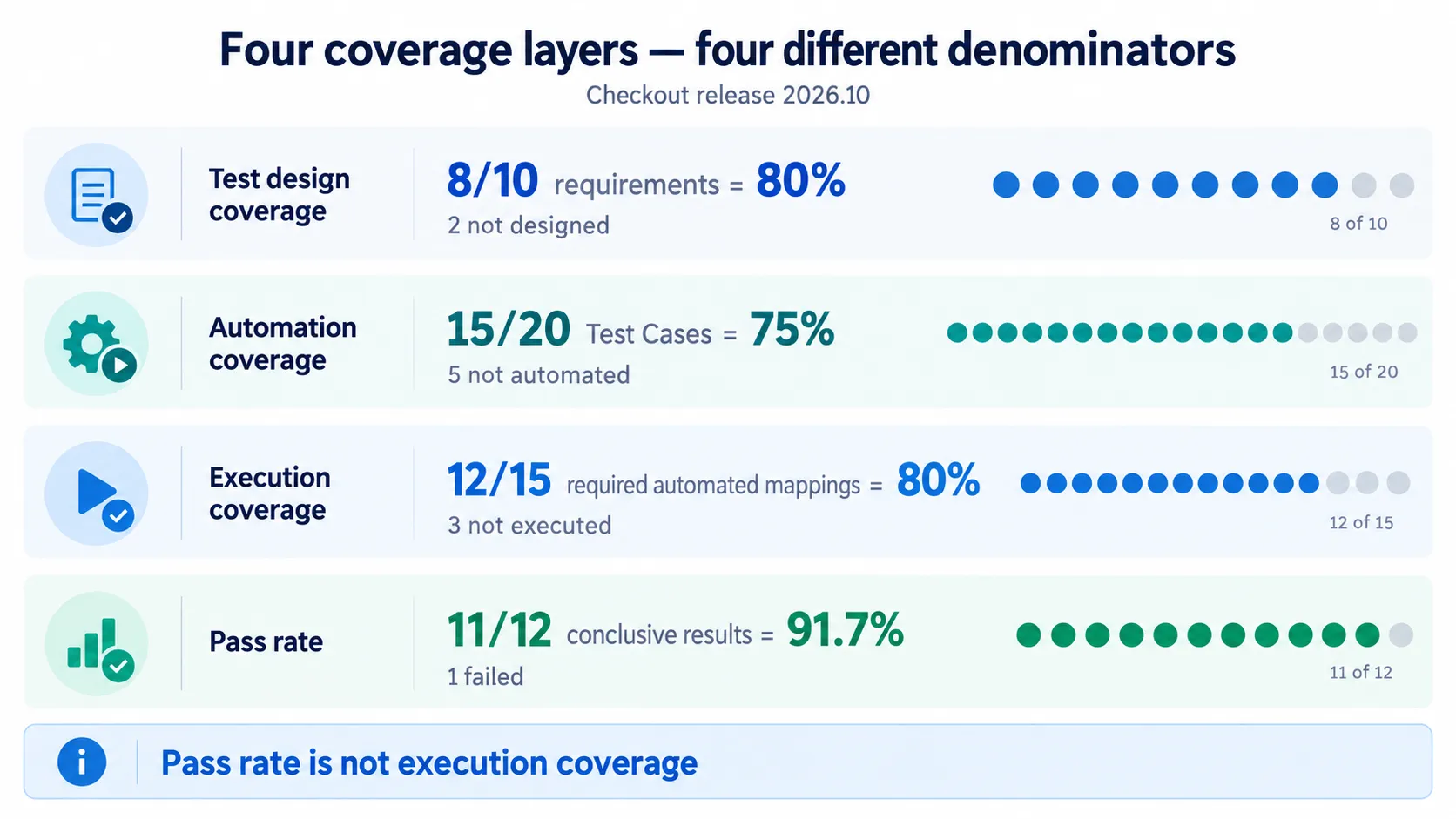
The same release scope can produce four valid percentages because every layer answers a different question.
The actionable gaps are different:
- two requirements need test design review
- five Test Cases are manual-only or awaiting automation
- three required automated mappings did not produce release evidence
- one executed test failed
A single weighted score would make those four actions harder to see.
Keep missing and inaccessible separate from zero
An empty API response can mean several things:
- there are no records
- the current user lacks access
- evidence expired under retention
- a provider call was throttled or failed
- the selected scope is wrong
- results were expected but never published
Use separate states such as None, No evidence, Partial access, Expired, and
Provider error. Only a confirmed empty eligible population justifies a zero denominator.
Use Azure’s native relations where they exist
Azure DevOps can provide several useful links:
- requirement-based suites link requirements and Test Cases
- associated automation links a Test Case and automated method
- pipeline results identify exact observed executions
- Requirements quality can show requirement-level test results for a selected pipeline stage
Microsoft documents these flows in Requirements traceability, Create and manage test suites, and Associate automated tests with test cases.
Use the native relation as provenance. Do not infer a stronger relation than the one the API or work item actually provides.
Compare like with like
Coverage trends require comparable scopes. Before comparing two periods, check:
- the same requirement or release boundary
- the same eligibility rules
- the same required sources and configurations
- stable logical test identity
- known additions, removals, splits, and renames
- compatible retention and access
If the denominator changed, show the change. A higher pass rate with fewer executed tests may be test scope drift, not improvement.
Do not force every team into Test Plans
Test Plans is valuable when Test Cases are the maintained definitions and the team needs planned manual execution or requirement-level reporting. Automation-first teams may keep test definitions in code and use a reviewed mapping to requirements or AC keys.
Both models can produce defensible metrics when identities, mappings, exact executions, and missing states are explicit. Neither model becomes reliable merely because it has more records.
How QaCockpit uses this evidence
QaCockpit for Azure DevOps currently calculates observed pipeline and test-result facts from accessible Azure evidence. It can show missing result intake and changes in observed test count. It does not currently read requirements or Test Plans and therefore does not claim requirement, acceptance-criteria, or Test Case automation coverage.
Future Intelligence modules may connect these layers. Every percentage will still need a visible denominator, provenance, scope, access state, and drill-down. That remains a roadmap requirement, not a currently shipped capability.
A metric review checklist
- Name the coverage layer
- Define the selected scope
- List the eligible denominator
- State which relation confirms each mapping
- Select the exact execution context
- Keep missing, inaccessible, and expired evidence separate
- Show manual-only designs explicitly
- Report pass rate only for conclusive executed results
- Explain denominator changes before comparing periods
- Link every aggregate to the rows behind it
Frequently asked questions
Is code coverage another coverage layer?
Yes, but it answers which code structures were exercised. It does not replace requirement, test-design, automation, execution, or outcome coverage.
Should skipped tests count as executed?
Report them separately. A discovered skipped row proves some execution context, but it does not provide a conclusive verification outcome.
Can I combine the layers into one readiness score?
Only after accepting a transparent formula and its tradeoffs. For operational work, the separate gaps are usually more useful than a weighted score.
What if we do not use Azure Test Plans?
Use stable requirement and logical test identities plus a reviewed mapping. Clearly label it as configured provenance rather than a native Azure Test Plans relation.
Microsoft documentation was checked on October 1, 2026.