Connect
Map the automation you already operate
Connect GitHub Actions or Azure DevOps, then select discovered repositories, branches, workflows, and pipelines. Add the framework and result context that makes each Test Source understandable.

QaCockpit Cloud · How it works
QaCockpit adds a quality-intelligence layer above the repositories, frameworks, and CI/CD systems your teams already trust.
This page describes the hosted QaCockpit Cloud workflow. Using QaCockpit inside Azure DevOps? Explore QaCockpit for Azure DevOps.
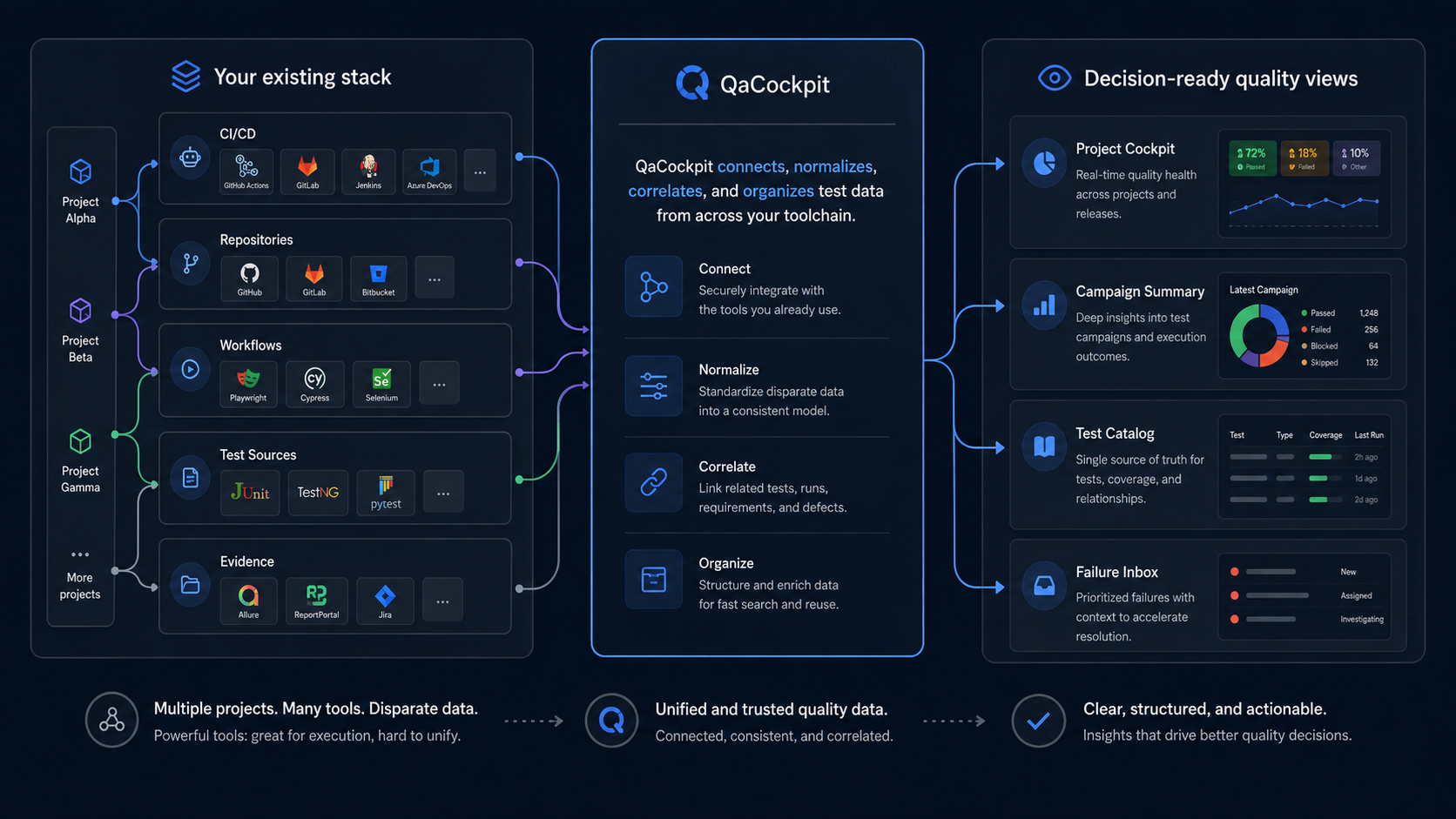
One connected operating model
Connect
Connect GitHub Actions or Azure DevOps, then select discovered repositories, branches, workflows, and pipelines. Add the framework and result context that makes each Test Source understandable.
Collect
Start existing CI/CD workflows from validated configurations or attach completed results to a campaign. JUnit reports, execution context, and protected artifacts remain connected to the exact attempt.
Understand
Compare expected scope with observed results, separate pipeline lifecycle from test outcome, and move from an organization signal to the exact project, source, test, failure, and artifact context.
Improve
Use Test Catalog, Failure Inbox, trends, ownership, and source-health signals to find recurring problems, slow feedback, maintenance gaps, and weak release evidence.
One durable quality record
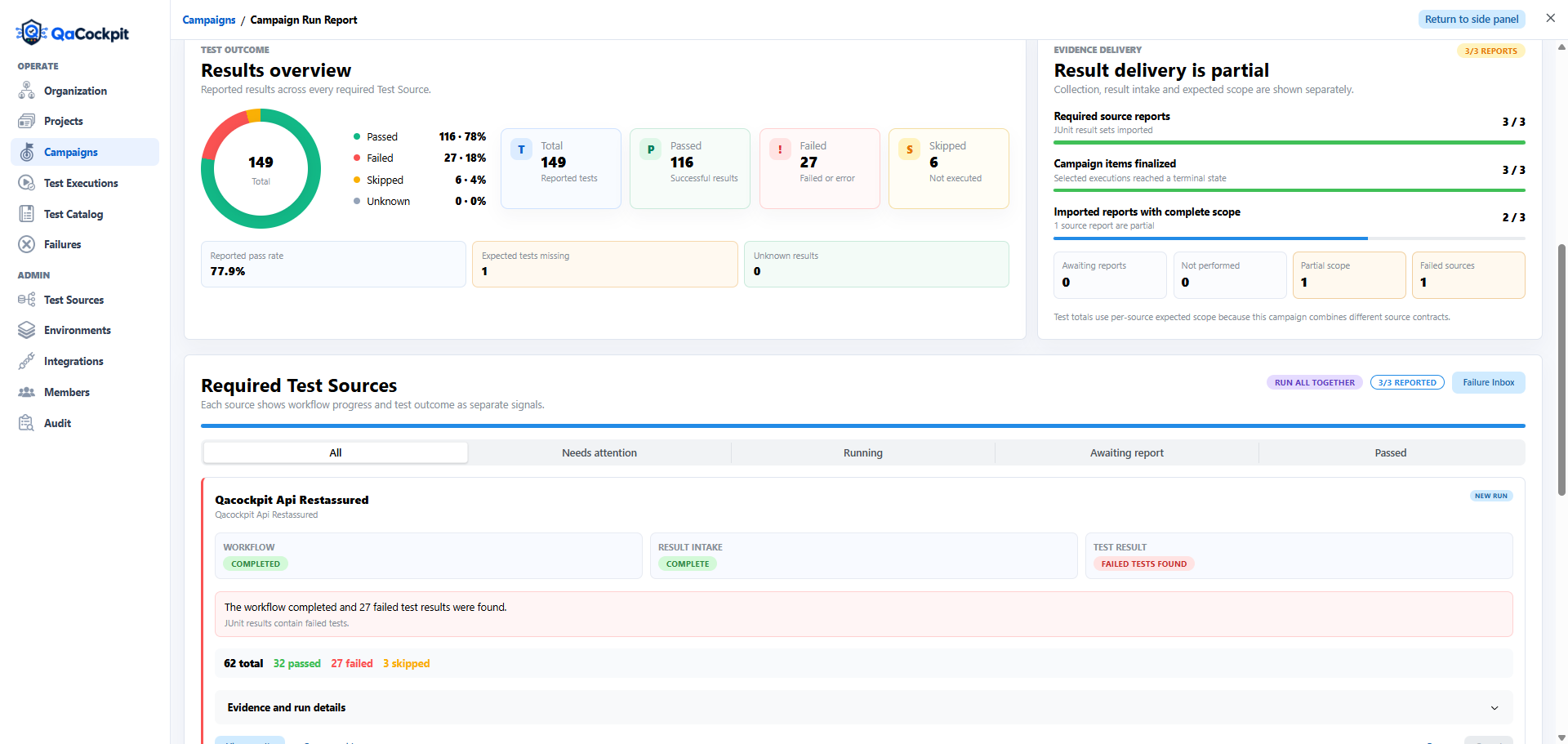
Campaign scope, source runs, attempts, expected tests, observed results, environment, failures, and artifacts remain connected after CI/CD finishes.
Campaign Run Report
Clear responsibility boundaries
Your CI/CD keeps the code, secrets, dependencies, and execution environment.
Tests, workflows or pipelines, result configuration, and dependencies.

Projects, Test Sources, campaigns, permissions, scope, failures, and reports.
GitHub Actions or Azure DevOps runs in the security model you control.
JUnit results, metadata, attempts, and authorized artifact evidence.
What changes for the team
See automation health, gaps, ownership, and cross-source campaign evidence.
Move from a failure signal to its exact run, stack, environment, history, and artifacts.
Read a clear quality summary without learning every repository and pipeline convention.
Frequently asked
No. Your repositories remain the source of truth and your existing CI/CD executes the workflows. QaCockpit coordinates runs and turns returned evidence into a shared quality view.
No. A project can combine multiple repositories, workflows, frameworks, and result-producing Test Sources. QaCockpit normalizes the operational signal without forcing a framework migration.
JUnit XML is the primary normalized result format. QaCockpit also keeps execution metadata and protected artifact evidence such as screenshots, logs, traces, videos, and archives when supplied by the integration.
Yes. Campaigns are collection sessions and can include executions already recorded in QaCockpit. Provider-specific retained-result adoption is available where the integration supports it.
Your workflow, connected
Describe your current automation landscape and we will map the first useful integration together.
Contact us