
Azure Test Plans supports static, query-based, and requirement-based test suites. All three organize Test Cases. Only one creates the native relation used for requirement tracking: the requirement-based suite.
That distinction matters when a dashboard says that a requirement has tests. A folder named after a User Story may look correct to a person while carrying no requirement relation that Azure can report.
This guide explains what a requirement-based suite proves, how to create one, which permissions it needs, and which conclusions still require separate execution evidence.
Three suite types answer different questions
| Suite type | How Test Cases enter the suite | Best use | Requirement relation |
|---|---|---|---|
| Static | A user adds and arranges Test Cases manually | Stable organization and nested groups | None from the suite name |
| Query-based | A work item query selects matching Test Cases | Dynamic grouping by tags, priority, area, or another field | None from query membership alone |
| Requirement-based | Azure creates a suite for a selected requirement work item | Planned testing and requirement traceability | Native requirement–Test Case relation |
Microsoft’s Test Plans FAQ describes the requirement-based type as the suite used for end-to-end requirement traceability. The implementation guide states that the relation to manual test execution is formed when a Test Case is linked through a requirement-based suite.
The suite type is therefore evidence. A matching title is not.
Which work item becomes a requirement?
The default process determines the usual backlog item:
- Basic uses Issue
- Agile uses User Story
- Scrum uses Product Backlog Item
- CMMI uses Requirement
- inherited processes may add custom eligible types
Do not hardcode User Story as the only valid requirement. The team’s actual process and
the Azure Requirements category determine which items can participate.
In a synthetic NovaCart Commerce project using the Basic process, Issue #1 is the
requirement. Its requirement-based suite contains three Test Cases for four labeled
acceptance criteria.
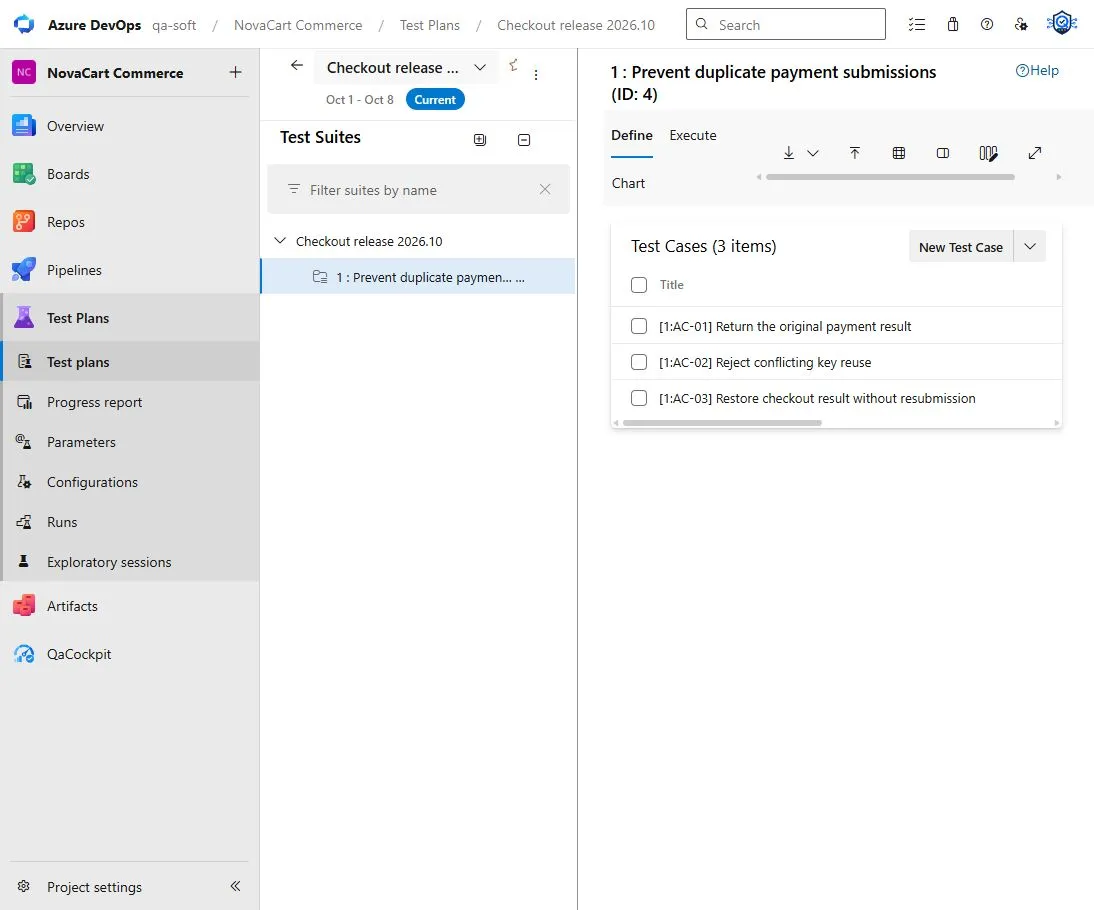
The native suite links each Test Case to Issue 1. The AC-01 labels are an additional team convention for criterion-level traceability.
Access and permissions come before the workflow
Microsoft documents separate access levels for authoring and execution. Basic users can execute tests and view reports. Creating and managing plans, suites, Test Cases, configurations, and parameters requires Basic + Test Plans or an eligible Visual Studio subscription. Stakeholder users cannot access the Test Plans portal.
Permissions also apply under the relevant Area Path. Managing suites requires the appropriate work-item edit and Test Plans permissions.
Check the current
manual test access and permissions
before designing a process that every contributor is expected to maintain. No access
must not become zero Test Cases in a report.
Create the relation deliberately
The documented flow is:
- Open the target Test Plan
- Choose
New SuiteandRequirement based suite - Query for the eligible backlog work items
- Select one or more requirements
- Create a suite for each selected item
- Add or create the Test Cases that verify that requirement
Azure then links each Test Case added through the suite to the selected requirement. See Create and manage test suites for the current portal flow.
Moving a Test Case into a static suite with the same title is not an equivalent relation. Creating a query-based suite that happens to find the same Test Cases is also not an equivalent relation.
What the suite proves
A requirement-based suite can prove that:
- the selected work item is represented in the Test Plan
- specific Test Cases are linked to that requirement
- planned executions can be reviewed in that Test Plans context
- associated automation can contribute results through those Test Cases
It does not by itself prove that:
- every acceptance criterion has a Test Case
- every Test Case is automated
- every required test ran for the selected release
- the tests exercised the artifact later deployed
- a passing historical result is still fresh enough
The suite is a test-design relation. Automation, execution, outcome, artifact identity, and deployment are separate evidence layers.
Requirement coverage is not acceptance-criteria coverage
Suppose Issue #1 contains four acceptance criteria and the suite contains three Test
Cases. Azure knows that the requirement has linked Test Cases. It does not know that the
three titles represent AC-01, AC-02, and AC-03, or that AC-04 has no design.
Stable labels can make that deeper mapping reviewable:
[1:AC-01] Return the original payment result
[1:AC-02] Reject conflicting key reuse
[1:AC-03] Restore checkout without resubmission
The labels remain a convention. The article on traceable acceptance criteria explains how to preserve them when wording changes.
Add automation only when the identities match
A Test Case can be associated with an automated method. Microsoft supports association from pipeline test results or from the Test Case’s Associated Automation tab. The method must have appeared in published results first.
Do not associate a method merely because its title sounds similar. Confirm that the manual design and automated implementation verify the same behavior at compatible boundaries.
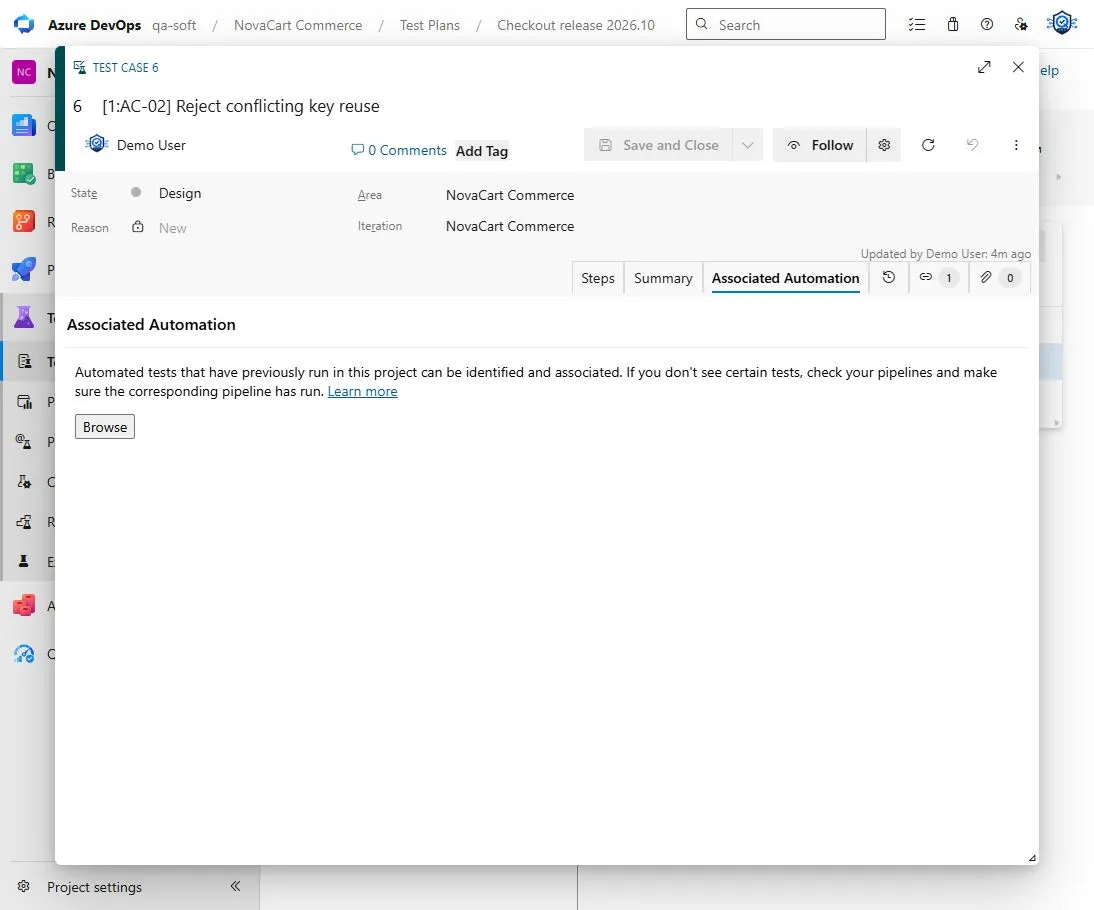
Available automation is not mapped automation. Azure waits for an explicit association.
The 19 October guide in this series covers the detailed constraints and both supported association flows.
Keep execution context explicit
The same Test Case can have results from several configurations, runs, branches, or builds. A release review needs the exact execution that belongs to its scope.
Record at least:
- Test Plan and suite
- Test Case ID
- test point or configuration where relevant
- exact Test Run and result
- product build or artifact tested
- environment
- attempt and timestamp
If the tested artifact is unknown, preserve artifact unknown. Do not repair the gap by
selecting the latest successful result.
When a requirement-based suite is worth the maintenance
It is usually valuable when the team:
- performs planned manual testing
- needs requirement-level test status in Azure
- mixes manual and associated automated tests
- uses Test Plans as the maintained test-definition source
- has the access level and ownership needed to keep the suite current
It may add duplicate administration when the team is fully automation-first, treats code as the only maintained test definition, and does not need native Test Plans execution. That team can still preserve traceability through stable logical test IDs and reviewed mappings. It should not create empty Test Cases only to improve a percentage.
Handle changes without hiding history
When a requirement changes:
- Review whether existing Test Cases still represent the accepted behavior
- Add a new Test Case when a new behavior needs independent verification
- Retire obsolete designs instead of silently reusing their names
- Review associated automation
- Select new execution evidence for the changed scope
The current suite shows the current design. Release evidence still needs to identify the revision and exact execution used for the decision.
How QaCockpit uses this evidence
QaCockpit for Azure DevOps does not currently read Test Plans or requirement-based suite relations. It reads accessible pipeline and test-result evidence and keeps missing or inaccessible data visible.
Future Data Readiness and Acceptance Intelligence may inspect native requirement links, suite types, Test Cases, and associations. Those capabilities remain roadmap direction, not shipped product claims. The team can use the native Azure relation today regardless of future QaCockpit support.
A practical setup checklist
- Confirm which work item types represent requirements
- Verify Test Plans access levels and Area Path permissions
- Create a requirement-based suite rather than a similarly named static suite
- Add only Test Cases that genuinely verify the requirement
- Use stable AC labels when criterion-level traceability is needed
- Associate automation only after identity review
- Keep manual-only tests explicit
- Select exact executions for release review
- Show missing and inaccessible data separately
- Revisit the suite when the requirement changes
Frequently asked questions
Is a query-based suite enough for requirement coverage?
No. It dynamically groups Test Cases but does not create the native requirement relation provided by a requirement-based suite.
Does creating the suite require Basic + Test Plans?
Microsoft currently documents Basic + Test Plans or an eligible Visual Studio subscription for creating and managing plans and suites. Basic access supports execution and reporting scenarios but not the full authoring workflow.
Does every Test Case in the suite need automation?
No. Manual-only coverage is a valid state. Automation coverage must use its own named denominator.
Does a passing suite prove release readiness?
No. The release decision also needs execution completeness, exact artifact and environment context, freshness, failures, missing evidence, and the team’s risk review.
Microsoft documentation and the synthetic Azure DevOps example were checked on October 1, 2026.