
Publishing automated test results to Azure Pipelines makes the execution visible. It does not automatically connect a test method to an Azure Test Case.
The association is a separate traceability decision. When it is correct, an automated result can contribute to the quality view of a Test Case and its linked requirement. When it is wrong, a reassuring green result can be attached to a different behavior.
This guide covers the current Azure DevOps web flow, the one-method constraint, and the identity checks to perform before creating the link.
Understand the three identities
An association connects three different records:
- Test Case work item — the maintained test design in Azure Test Plans
- Automated test method — the implementation discovered in published pipeline results
- Test result — one outcome from one execution, attempt, configuration, and time
The association links the first two. It does not permanently attach every future result or prove that a particular release ran the method.
Release evidence still needs the exact execution.
Prerequisites
Before the test can be associated:
- the Test Case must exist
- the automated test must run in Azure Pipelines at least once
- its result must be published so Azure can discover the method
- the user needs the required Test Plans access and permissions
- the manual design and automated behavior must represent the same scenario
Microsoft documents the current frameworks and permissions in Associate automated tests with test cases. The Azure DevOps portal path includes supported Python and Java results as well as the documented .NET test frameworks.
Associate from a pipeline result
Use this route when you begin from known automation:
- Open the pipeline run where the method executed
- Open the Tests tab
- Select the automated test
- Choose
Associate Test Case - Find the intended Test Case
- Review the identity and save the association
This route starts with an observed method, which makes it easier to confirm the exact framework name Azure discovered.
Associate from a Test Case
Use this route when the Test Case is the maintained design:
- Open the Test Case work item
- Open
Associated Automation - Choose
Browse - Select the pipeline and a run where the method appeared
- Select the intended method
- Save the association
In the NovaCart example, published automated results are available to browse, but Test
Case #6 remains unassociated. Azure does not choose a result based on similar wording.
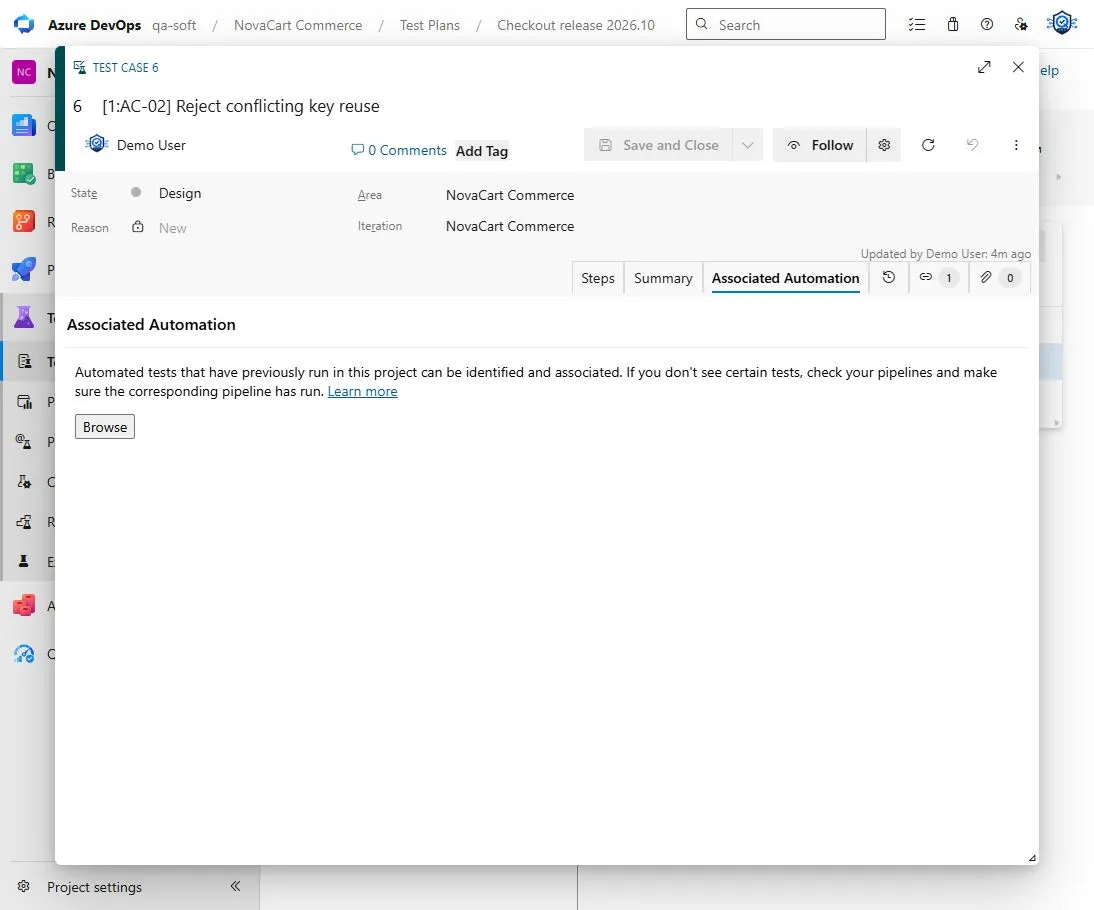
Published automation is discoverable. The mapping remains empty until a user creates it deliberately.
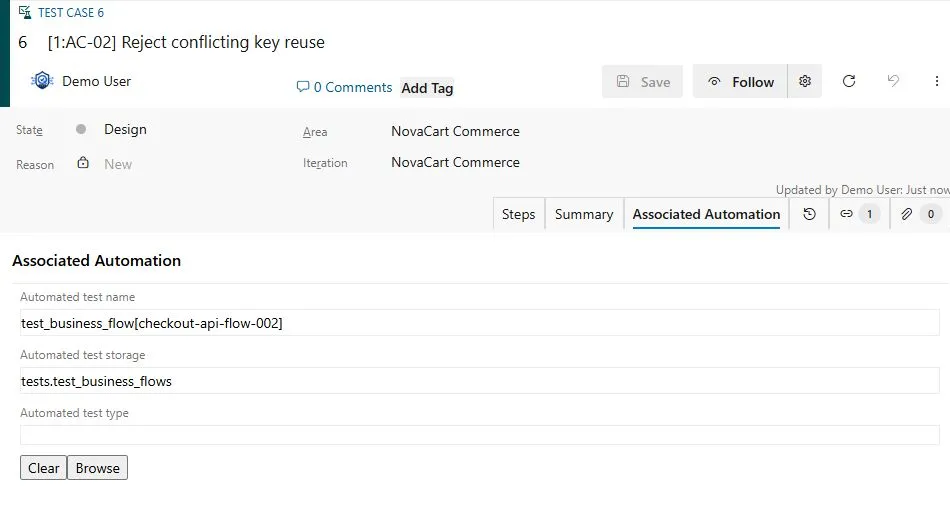
After a deliberate association, Azure stores the automated test name and storage against the maintained Test Case.
One Test Case can have only one associated method
Microsoft documents an asymmetric rule:
- one automated test method can be associated with multiple Test Cases
- one Test Case cannot have more than one associated automated test method
This matters for parameterized and cross-browser automation. A single Test Case with three manual parameter rows cannot be associated with three separate automated methods. Manual Test Case parameters are not passed into the associated automated test.
Do not hide the mismatch by choosing an arbitrary method. Decide which identity is primary:
- keep one logical parameterized method when it represents the whole Test Case
- split the Test Case when variants are independently owned or reported
- keep additional automation outside the Test Case association and document the broader mapping
The correct choice depends on how the team reviews failures and coverage.
Automation Status is not execution status
The Test Case field Automation Status = Automated means an automated method is
associated. It does not mean:
- the method ran in the selected build
- the result was conclusive
- every configuration executed
- the latest result passed
- the method tested the artifact later deployed
Likewise, Not Automated can describe a valid manual Test Case. It is not automatically
a quality gap.
Check logical identity before associating
Names can change across frameworks and adapters. A display name may contain parameters, browser names, class names, or generated suffixes.
Before saving the association, compare:
- the behavior and expected result
- repository and test project
- fully qualified method identity where available
- parameter and configuration semantics
- whether retries or shards create duplicate-looking rows
- whether the method is stable across ordinary refactors
Do not associate by title similarity alone. If the mapping is uncertain, record a candidate and ask the owning engineer.
Connect the Test Case to a requirement separately
The automation association does not itself link the Test Case to a User Story, Product Backlog Item, Issue, or Requirement. A requirement-based suite supplies that native relation.
The complete planned-testing chain is:
Requirement work item
  → requirement-based suite
  → Test Case
  → associated automated method
  → exact execution result
Every arrow has its own meaning. The guide to requirement-based suites explains the first two arrows.
Select an exact execution after association
Suppose the associated method appeared in:
- a pull-request validation run
- a nightly regression
- a rerun after an infrastructure failure
- a release-candidate execution
The association is the same, but only one result may belong to the release review. Record the exact pipeline, run, attempt, branch, commit, artifact, and environment available for that result.
Azure run #75 in the synthetic project contains 25 published results. Those results are
valid execution evidence. Until the association is created, they do not become Test Case
automation evidence by proximity.
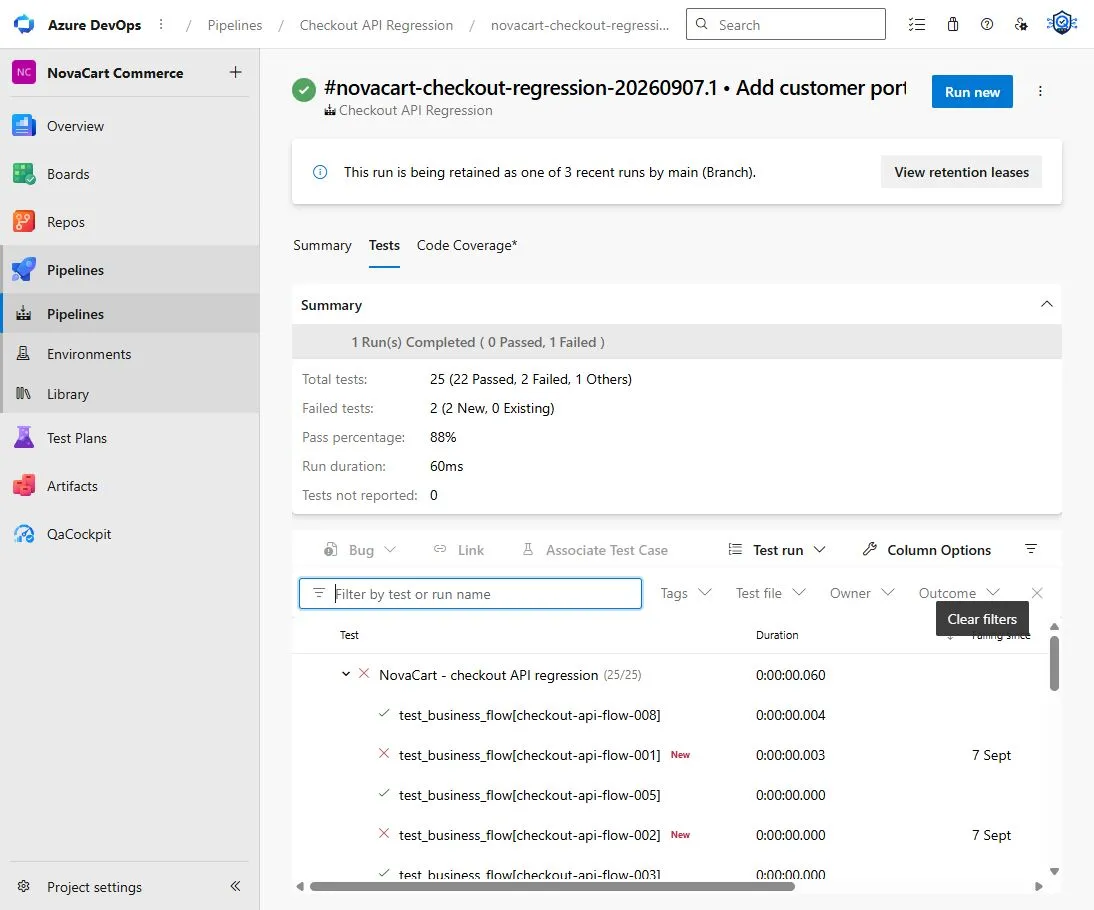
An exact result set answers what ran. The Test Case association answers which maintained design the method implements.
Handle refactors and test replacement
An association can become stale when a method moves or is replaced.
Use a small review process:
- Treat a pure rename or move as an identity migration
- Confirm that the new method preserves the same behavior
- Update the association through the supported Azure flow
- Preserve historical results as results of their original executions
- Reassess the Test Case when the behavior changes materially
Do not rewrite old execution evidence to use the new method name.
What not to infer
Do not infer that:
- a published test is automatically associated
- a matching display name proves the same behavior
Automatedmeans executed or passed- Test Case parameters drive automated parameters
- one associated method covers every browser, shard, or data row
- a passing result belongs to the selected release candidate
Association is one confirmed link, not an end-to-end release verdict.
How QaCockpit uses this evidence
QaCockpit for Azure DevOps currently reads accessible pipeline executions and published test results. It does not currently read or modify Test Case automation associations.
Future Test and Acceptance Intelligence may use native associations as one provenance source. Any such feature must preserve current-user access, partial data, stable logical identity, and exact execution context. It remains product direction until implemented, verified, and released.
An association review checklist
- Confirm the Test Case describes one maintained behavior
- Run and publish the automated method in Azure Pipelines
- Verify framework support and access permissions
- Compare the method identity and behavior, not only its title
- Account for parameters, configurations, shards, and retries
- Create the association from the pipeline result or Test Case
- Verify
Automation Status - Confirm the requirement relation separately
- Select exact executions for release reporting
- Review the association after a refactor or behavior change
Frequently asked questions
Can I associate Python or Java tests without Visual Studio?
Yes. Microsoft documents association through the Azure DevOps web portal from pipeline results or the Test Case, including supported Python and Java tests.
Can one Test Case have several associated methods?
No. Microsoft currently documents one associated method per Test Case. One method may be associated with several Test Cases.
Are manual Test Case parameters sent to automation?
No. They remain manual-test parameters and are not passed to the associated method.
Does association run the test automatically?
No. Execution still occurs through the configured pipeline or Test Plans automation flow. The association provides traceability between the method and Test Case.
Microsoft documentation and the synthetic Azure DevOps example were checked on October 1, 2026.