
Ten browser tests fail in setup. Is the environment broken?
One account type fails while the rest pass. Is the test data bad?
One test alternates between pass and fail. Is it flaky?
Each pattern suggests a useful next check. None proves a root cause by itself.
Replace labels with falsifiable questions
Flaky, bad data, and environment issue are often used as routing labels. That can
be helpful for triage if the label remains provisional. It becomes harmful when the
label closes the investigation.
Ask questions that another piece of evidence can answer:
- Does the same operation fail across independent tests and pipelines?
- Do failures share a setup step, account, fixture, endpoint, or agent?
- Does the first error occur before the product action or during it?
- Do comparable attempts use the same commit, environment, and data?
- Does a controlled change remove the failure while other conditions remain stable?
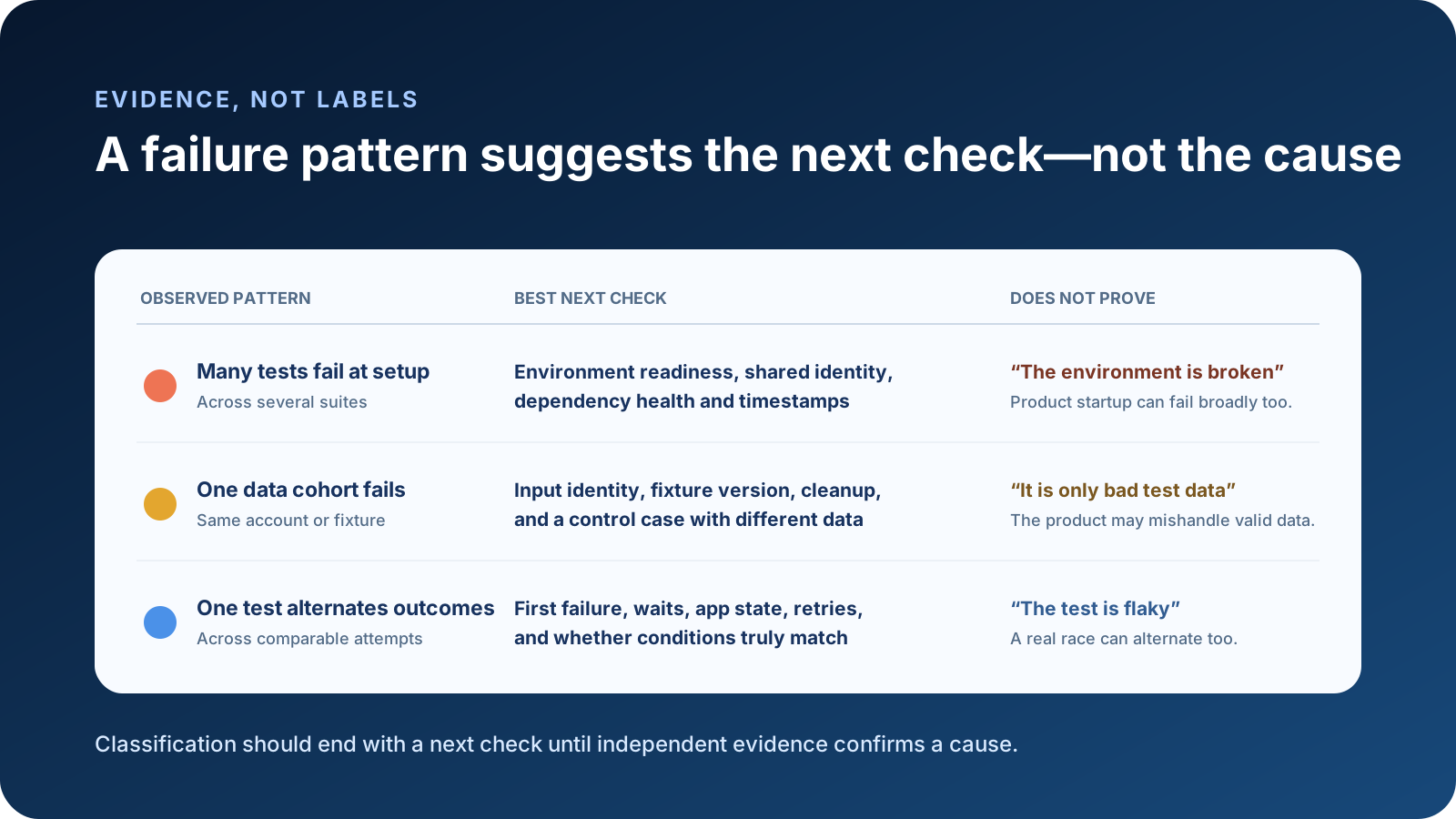
Scenario 1: many tests fail during setup
A synthetic run called QC 05 Infrastructure Failure reports broad failures before the
business assertions begin. Several suites show connection or authentication errors in a
short interval.
This pattern supports checking:
- environment readiness and deployed candidate identity
- shared identity provider, DNS, network, or dependent service state
- agent and browser setup
- timestamps around the first failure
- whether another independent pipeline saw the same dependency fail
It does not prove the environment is broken. A product startup regression, incompatible configuration, or shared test helper defect can create the same broad shape.
The most useful artifact is the earliest causal error, not 40 later screenshots of tests failing because login never completed.
Scenario 2: one data cohort fails
In a synthetic checkout suite, only tests using one customer tier fail. Other tiers pass through the same UI and environment.
Check:
- exact fixture version and input identity
- whether the data satisfies the current business rules
- cleanup from earlier attempts
- permissions and feature configuration for that cohort
- a control case with different data and the same operation
Do not jump from correlation to bad data. The data may be valid and expose a product
defect that only affects that tier. A repair script that makes the test pass can erase
evidence of the defect.
Scenario 3: one test alternates outcomes
One test fails, passes on retry, and fails again the next day. That is a reliability
signal, but flaky test is still ambiguous. Instability may belong to the test code, the
application, shared data, an external dependency, or the environment.
Inspect:
- first failure and every attempt, not only the final result
- whether the failure signature is stable
- explicit waits, actionability, and asynchronous state
- mutable accounts, order dependence, and parallel workers
- server logs or traces around the relevant operation
- whether the candidate and environment were actually comparable
Selenium’s official guidance explains how race conditions arise when dynamic elements are not ready and why fixed sleeps can be both too short and unnecessarily slow. It also warns against mixing implicit and explicit waits because timing becomes unpredictable. See Selenium waiting strategies.
Playwright performs actionability checks before interactions and provides retrying web assertions. That removes many manual waits, but it does not make the application, environment, or test data deterministic. See Playwright auto-waiting.
Build an evidence packet before assigning a cause
For a failure worth investigation, retain a small packet:
| Category | Minimum evidence |
|---|---|
| Identity | Logical test, suite, project, pipeline, run, attempt |
| Candidate | Branch, commit or build identity, deployment version if relevant |
| Timing | Start, first failure, retry, and surrounding incident window |
| Scope | Other tests, suites, pipelines, or users affected |
| Setup | Agent, browser, environment check, account, fixture version |
| Diagnostics | Error, stack, safe logs, trace, screenshot, attachment |
| History | Comparable prior outcomes and failure signatures |
| Experiment | One controlled change and its result |
Do not put secrets, session state, tokens, or sensitive customer data into the packet. Redaction must preserve the field needed for comparison, such as a synthetic fixture ID.
Use occurrence patterns carefully
Clustering repeated failures by normalized message, stack location, test identity, or time window can reduce duplicate investigation. It still needs an escape hatch. The same message can have different causes, and one root cause can produce different messages.
Useful status language is evidence-based:
environment candidate— broad dependency evidence exists, not confirmeddata candidate— failures correlate with an input cohort, control still neededtest instability candidate— comparable attempts alternate, cause still openproduct candidate— product behavior is implicated, diagnosis still requiredunknown— available evidence does not support a narrower route
The word candidate matters.
Three best-next-check exercises
A. Twenty tests fail authentication within one minute
Best next check: compare the first authentication error with identity-provider and environment readiness evidence, plus one independent client. Do not immediately rerun all tests or declare an outage.
B. Three checkout tests fail only for one synthetic account
Best next check: verify the fixture and run a control with a different account while preserving the original error. Do not edit the fixture before recording what made it distinct.
C. One UI assertion passes on the second attempt
Best next check: inspect the first attempt, application state, locator or wait behavior, and whether the second worker used equivalent conditions. Do not reduce it to green.
These exercises intentionally ask for the next check, not a confirmed classification.
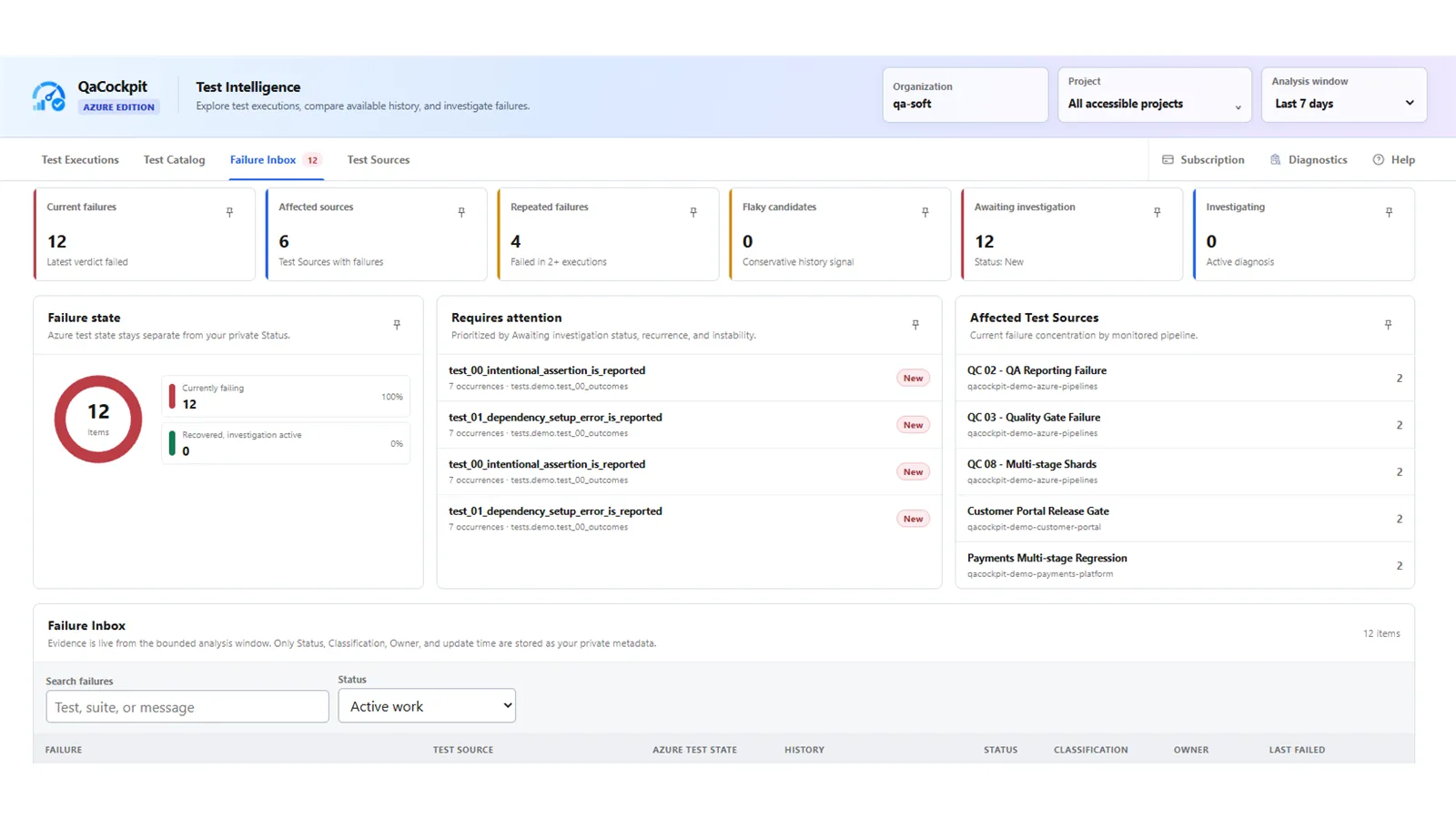
Pilot screenshot using synthetic qa-soft data, captured 29 October 2026 from
extension 0.0.121. The visible patterns are investigation inputs, not automatic root
cause labels.
QaCockpit’s Failure Inbox can organize accessible failure occurrences for investigation.
It does not make a broad-count heuristic a root-cause engine. The reliable workflow is to
preserve evidence, narrow the hypothesis, run a controlled check, and keep unknown when
the facts do not support a stronger claim.