
Linking a pull request to its work item creates one of the most useful traceability edges in Azure DevOps:
Requirement or Bug → pull request → commitsThe link explains why the change exists and which code implemented it. It does not prove that the change passed the required tests, reached an environment, or was accepted by the customer.
Problems begin when merging the PR also moves the work item into a state the team reads as fully done. Code integration, verification, deployment, and acceptance are separate events even when Azure can transition them through one checkbox.
Require the link before debating the final state
Azure Repos branch policies include Check for linked work items. Microsoft documents
two useful modes:
- optional warns when a PR has no linked work item but allows completion
- required blocks completion until at least one work item is linked
Configure the policy under the target branch or through the Azure CLI. See Set and manage branch policies.
Start with optional mode when legacy work, dependency updates, or operational changes do not consistently use product work items. Move to required mode after the team agrees which exceptions still need a traceable record.
Do not create meaningless placeholder items only to satisfy a blocking rule.
Link the work item to the PR, not every test result
The PR is the natural change boundary. It contains the review discussion, commits, and merge result. A linked work item can show the PR in its Development section.
The work item does not need to be repeated in every downstream automated-test name. Build and deployment records can carry change and work-item context when the pipeline topology preserves it. Detailed test mappings should be added only where requirement- or criterion-level coverage creates value.
In the synthetic NovaCart project, Issue #1 is linked to a feature branch and commit.
That confirms the requirement-to-change edge while leaving later evidence explicit.
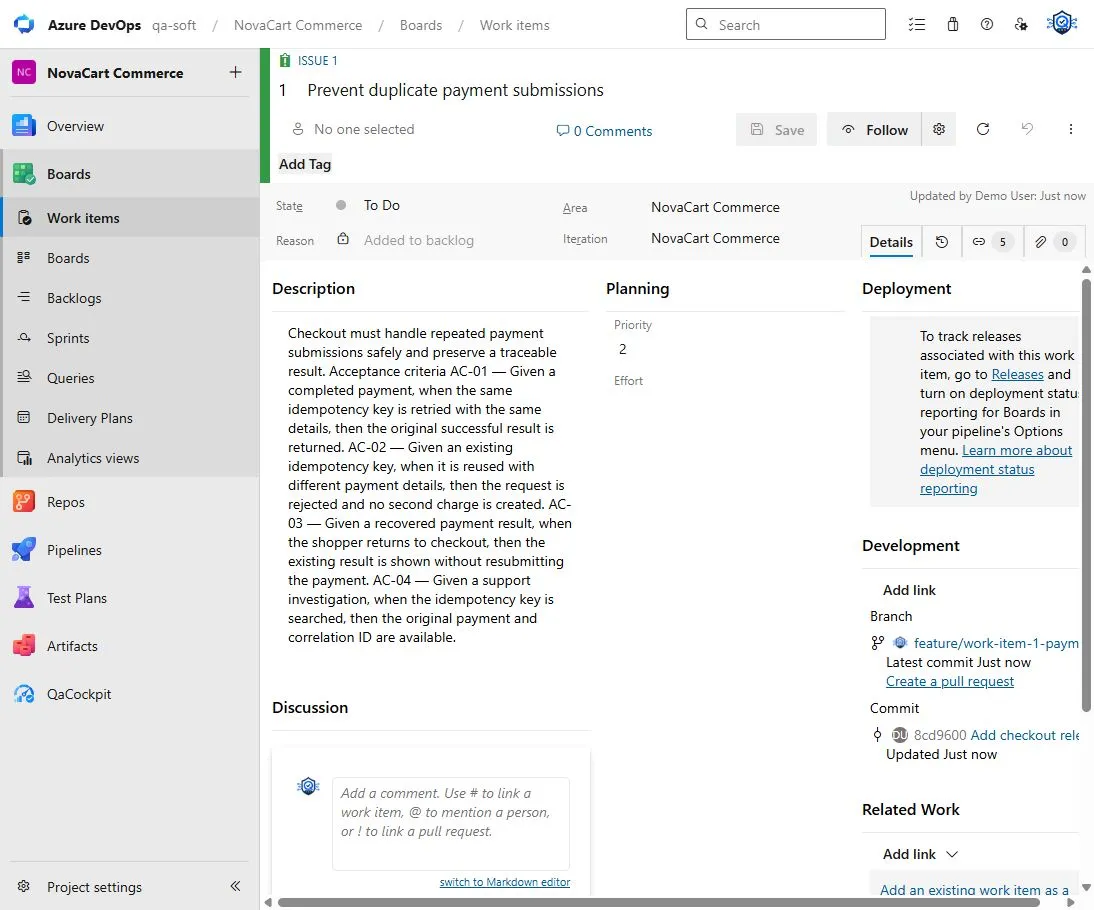
The native development links show which change belongs to the work item. They do not claim that the change was tested or deployed.
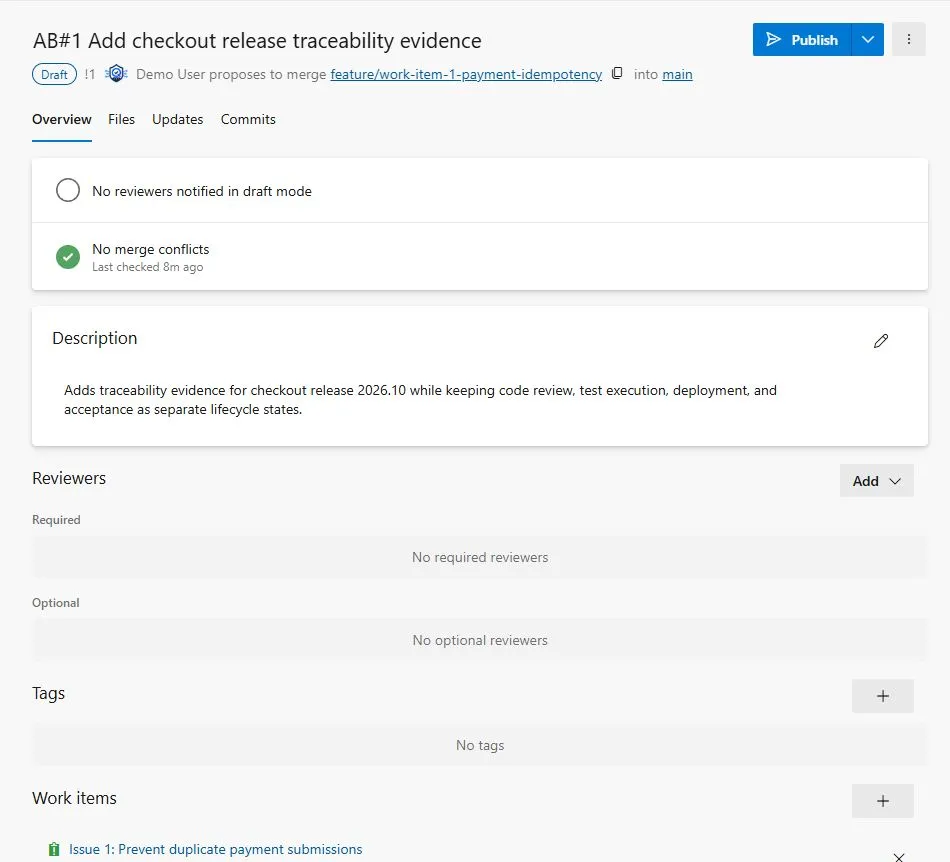
The draft PR records the code-integration edge and its linked Issue without merging the change or advancing the work-item state.
Understand the merge-time transition
When completing an Azure Repos pull request, Azure can Complete associated work items after merging. The CLI exposes the same concept through --transition-work-items.
Microsoft documents it in
Complete, abandon, or revert pull requests.
This action moves linked work items to the next logical workflow state. The exact state depends on the process and customization. The transition is convenient, but its meaning is defined by the team.
If the next state means code integrated, the automation is accurate. If the state means
verified in production, the transition is premature.
Define what Done means in this workflow
A useful lifecycle distinguishes at least these facts:
| Event | Evidence | What it proves |
|---|---|---|
| PR completed | Merge commit and linked work item | The selected code change entered the target branch |
| Build produced | Exact pipeline run, source SHA, artifact ID or digest | A product candidate was created |
| Tests completed | Exact executions and expected-scope evidence | Observed verification for a named candidate and context |
| Deployment completed | Deployment record and consumed artifact | The candidate reached the named environment |
| Requirement accepted | Team’s accepted workflow state and review evidence | The requirement met the team’s agreed acceptance gate |
One event can trigger another. It should not be used as proof that the later event already happened.
Choose one of three practical state models
Merge completes the work item
Use this only when the work item represents implementation work and Done explicitly
means merged. Verification and release must be tracked elsewhere without ambiguity.
Merge moves the work item to a verification state
This is usually safer for product requirements. The PR transition can move the item to
Resolved, Ready for test, or another configured state. Test and product evidence then
control the final transition.
Merge does not transition the work item
Keep the checkbox off when state transitions require a deliberate review or when one PR only implements part of the requirement. The native link still preserves traceability.
No model is universally correct. The state names and automation must match the team’s real definition.
Handle several work items and partial implementation
A PR can link several work items. Completing it does not guarantee that every linked item is fully implemented. One work item can also require several PRs.
Before enabling automatic transitions, decide:
- whether the PR must fully satisfy every linked item
- how partial or preparatory changes are labeled
- whether Bugs and requirements use different transition rules
- who confirms that acceptance criteria were met
- how reverted changes affect the state
For partial work, preserve the link but leave the requirement active or move it only to a state that describes the actual progress.
Keep pull-request validation separate from release evidence
Build validation on a branch policy can require a successful PR pipeline. That result is valuable, but it usually runs against the proposed merge or source branch rather than the final product artifact deployed later.
Do not infer that:
- PR validation tested the release artifact
- every required downstream pipeline ran
- the deployed environment contains the merge
- a linked work item had acceptance-criteria coverage
- a completed PR means the production change succeeded
Trace the later build, artifact, tests, and deployment through their own exact IDs.
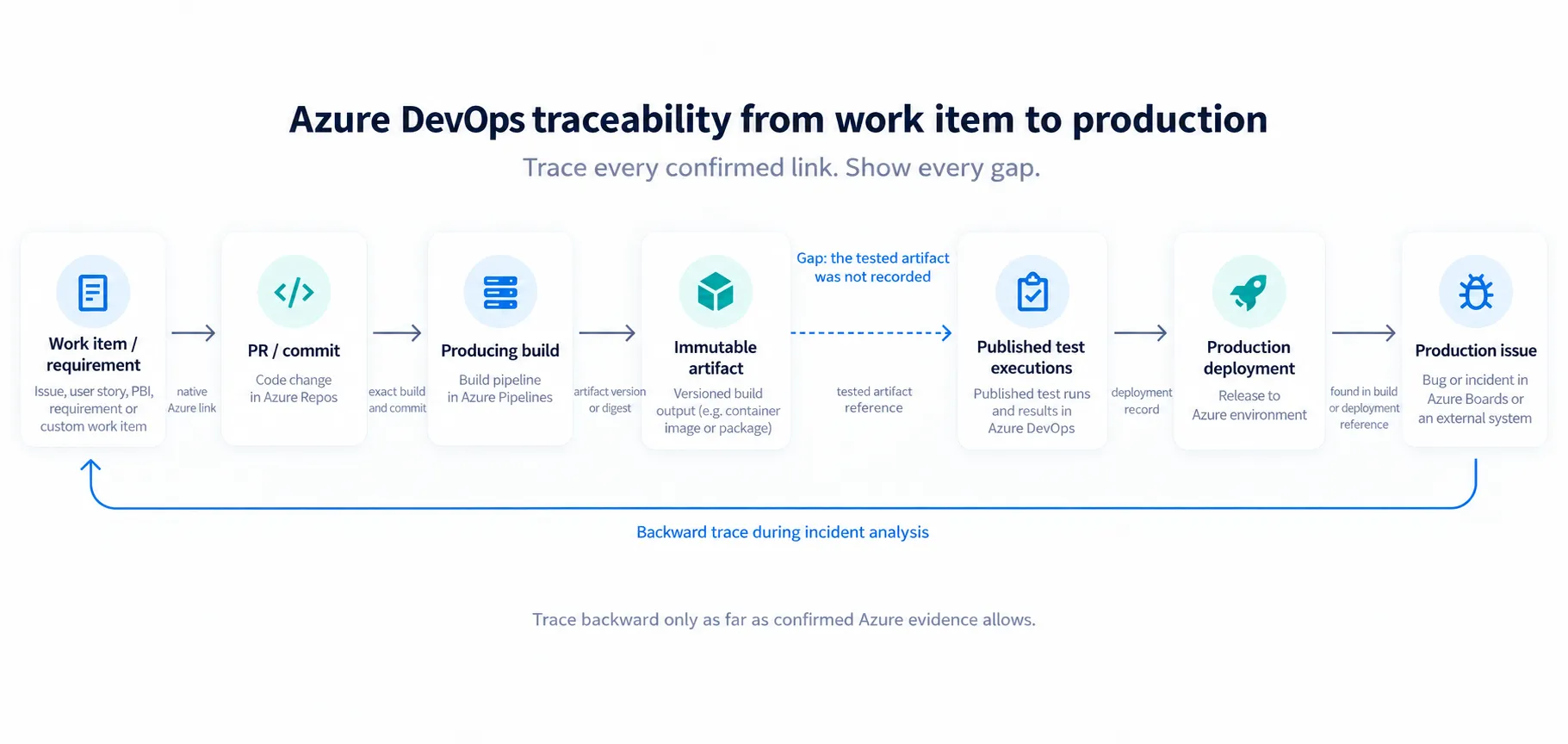
A linked PR is one confirmed edge. The remaining chain still needs build, test, deployment, and feedback evidence.
A lightweight PR policy
The following policy is strict enough to improve traceability without pretending that a PR closes the release lifecycle:
- Every product change links at least one meaningful work item
- Infrastructure and maintenance changes use an appropriate operational item or a documented exception
- The target branch warns or blocks missing links
- PR completion does not automatically claim test or deployment completion
- The merge commit remains connected to the linked work items
- Downstream pipelines preserve exact build and artifact identity
- Verification uses exact executions rather than the latest green run
- Final work-item state follows the team’s real acceptance gate
Trace a production Bug backwards
The work-item-to-PR link becomes particularly useful after a production problem:
Production Bug
  → deployment
  → artifact and build
  → merge commit and PR
  → original requirement
Without the PR link, the final step may depend on commit-message search or team memory. With the link, Azure can preserve the requirement-to-change relation while the remaining release records explain what was built and deployed.
The broader work-item-to-production traceability guide covers the full chain and its common gaps.
How QaCockpit uses this evidence
QaCockpit for Azure DevOps does not currently read Azure Boards or Azure Repos relations. It organizes accessible pipeline executions, test results, missing evidence, and private report scope.
Future Data Readiness and Release Scope capabilities may follow native work-item, PR, build, and deployment links. They must show the provenance of every edge and stop when evidence becomes unknown. This is roadmap direction, not a current product capability.
A rollout checklist
- Audit how current PRs reference work items
- Decide which changes require a linked item
- Start the branch policy in optional mode if exceptions are unclear
- Define the meaning of every post-merge work-item state
- Decide whether merge may transition work items
- Test multi-item and partial-implementation scenarios
- Preserve exact build and artifact identity downstream
- Verify release evidence separately from PR validation
- Review reverted and cherry-picked changes
- Make the policy blocking only after the exceptions are explicit
Frequently asked questions
Can Azure Repos block a PR without a linked work item?
Yes. Check for linked work items can be configured as required. Optional mode produces
a warning without blocking completion.
Should merging automatically close the work item?
Only when the resulting state accurately means code merged. If Done implies testing,
deployment, or acceptance, use an intermediate state or a later deliberate transition.
Does PR build validation prove release readiness?
No. It proves the configured validation ran successfully for the PR context. Release readiness needs the exact release candidate, required test scope, deployment context, and remaining risk.
What if one PR implements only part of a work item?
Keep the link for traceability, but do not transition the item to a state that implies the whole requirement is complete.
Microsoft documentation was checked on October 1, 2026.