
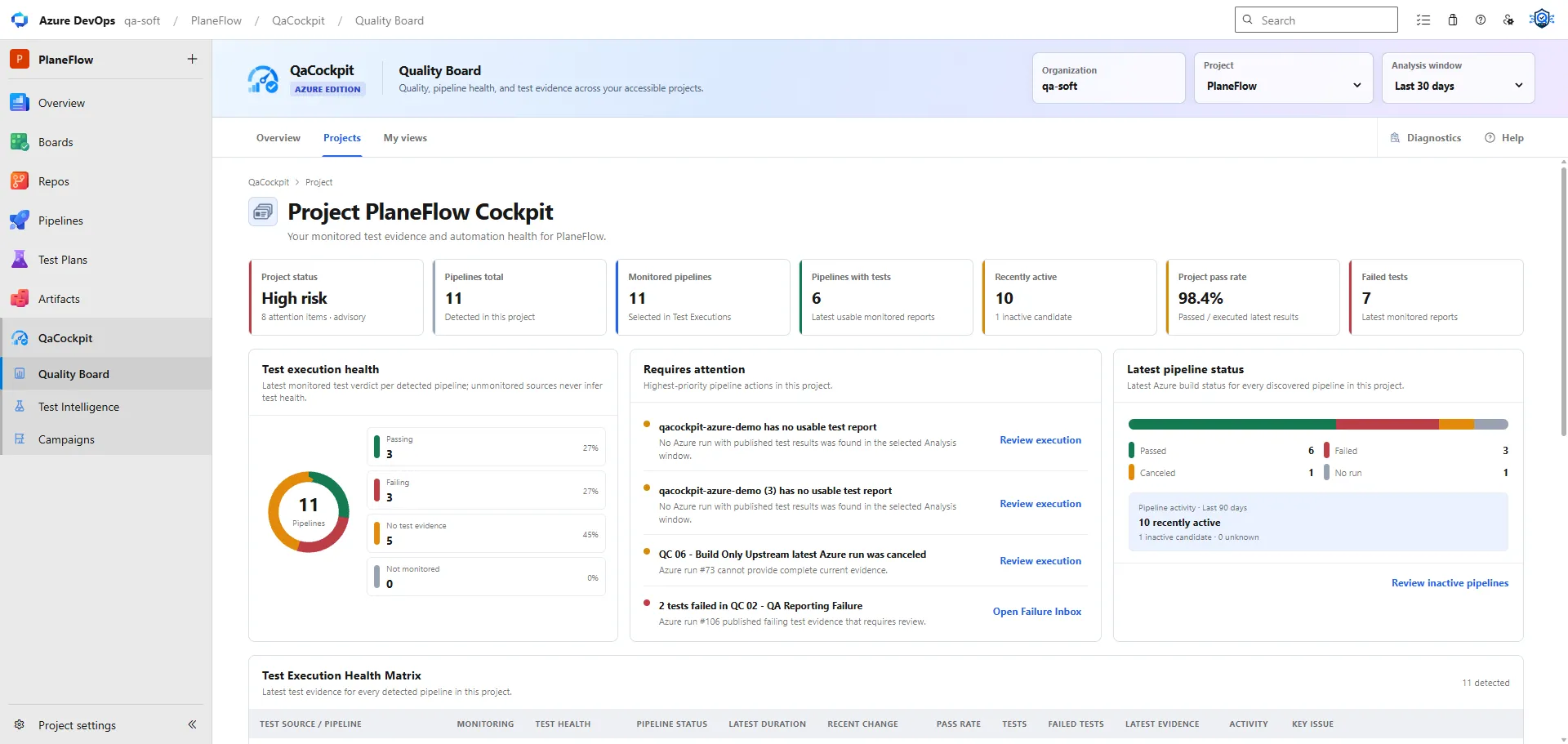
Your API regression, browser tests, and smoke pipeline are all green. Each finished this morning. The runs even use the expected branch. Before treating them as release evidence, there is one more question to answer:
Did they test the application versions and environment that this release requires?
A test run can be current and successful while exercising yesterday’s deployment. The useful review traces a selected execution to what it actually tested. This article follows one fictional release through that check, including the gaps that a recent-run dashboard alone cannot resolve.
Define the candidate before selecting the evidence
For this example, release R42 contains two application components:
| Component | Candidate version | Required verification context |
|---|---|---|
| Orders API | orders-api 4.2.0 |
API regression in release-test, with the agreed database and feature configuration. |
| Web application | web 7.8.0 |
Browser regression against this web version and orders-api 4.2.0 in release-test. |
| Deployed combination | Both candidate versions | Smoke checks of the intended combination in release-test. |
Assume these version numbers identify immutable packages in the example registry. In a real review, retain their full package references or digests and producing builds. A label that can be reassigned, such as a mutable container tag, needs a more precise identifier.
The API, web application, and test suites can live in different repositories. Their commit SHAs need not match. The source revision of a browser test suite tells you which tests ran; it does not by itself identify the web artifact deployed behind the URL those tests visited.
Three green runs can describe three different contexts
At 09:00 UTC, the reviewer finds the following completed executions. The product, versions, times, and run numbers are synthetic examples.
| Selected run | Reported result | What the deployment evidence establishes |
|---|---|---|
| API regression, run 481 | 240 passed; completed 07:20 UTC | orders-api 4.2.0 in release-test: matches its required context. |
| Browser regression, run 732 | 120 passed; completed 07:40 UTC | web 7.7.0 with orders-api 4.2.0 in release-test: wrong web version. |
| Smoke, run 915 | 20 passed; completed 08:10 UTC | Both candidate versions in integration-test: wrong environment for this review. |
All 380 reported tests passed. The arithmetic is correct. Only the API row currently matches the stated release verification context.
The browser and smoke results remain useful evidence of what they tested. They cannot fill the required rows merely because they are the latest successful runs. Nor does a different context prove the candidate is defective: it means the required observation is still missing.
Trace each run through to the tested application
For every required source, follow the same chain:
- Identify the exact execution. Record the Azure organization, project, pipeline, run, and relevant test execution or attempt. Use its exact link.
- Identify the test revision. Record the repository revision that supplied the tests and any relevant run parameters or configuration.
- Identify the application artifacts. Inspect the producing build, selected pipeline resources, package references, or image digests used by deployment.
- Confirm the actual deployment. Check the deployment record or an application version check captured during the test. An artifact downloaded by a job does not prove it was the application reached by the tests.
- Match the environment and time. Establish which environment and relevant configuration the tests used, including whether a deployment changed while they ran.
- Check the results and required scope. Preserve missing reports, partial results, skipped checks, failures, and unknown scope alongside the version match.
When the chain breaks, record the uncertainty and an owner. Do not infer the tested version from a branch name or from a version endpoint queried hours after the run.
Azure Pipelines provides resource version and artifact traceability. Its manual resource version picker can select a particular producing run. The chosen resource version and the test pipeline’s own branch are separate parts of the record. See Microsoft’s pipeline resources documentation.
Correct the evidence selection without hiding earlier results
In the example, the reviewer can first look for existing completed runs that match R42. New execution is necessary only when the available evidence does not satisfy the team’s criteria.
Suppose the team then deploys the intended combination and records:
| Required source | Evidence selected at the next review | Result of the context check |
|---|---|---|
| API regression | Run 481, retained from the first review | Still within the team’s freshness rule; relevant API version, configuration, and dependencies remain unchanged. |
| Browser regression | New run 734, completed 10:05 UTC | 120 passed against web 7.8.0 and orders-api 4.2.0 in release-test. |
| Deployment smoke | New run 917, completed 10:20 UTC | 20 passed against the required combination in release-test. |
The new review includes the exact deployment and artifact references for runs 734 and 917. Runs 732 and 915 stay in history as evidence of their original contexts. They are not silently relabeled or replaced in the first review record.
The version-and-environment condition is now satisfied for these three sources. The decision owner still checks agreed scope, failures and exceptions, evidence age, and any separate security or operational gates. If a shared dependency changed after run 481, its reuse needs reassessment too.
Use the release readiness report template to preserve the two reviews and the reason for each changed selection.
Use My views for current context and My campaigns for selected runs
In QaCockpit for Azure DevOps, Quality Board → My views groups pipelines from accessible projects in one organization. A source can use an exact selected branch; the view can show older evidence using a 7, 14, 30, or 90-day threshold, or leave that age check Off.
Those settings make the current scope easier to understand. They do not establish that every latest run tested one release candidate. A seven-day freshness setting also does not enforce a team’s stricter release rule, such as the 24-hour window in the separate report-template example. Off disables the age check; it does not make an old result suitable for a new decision.
My campaigns lets the user prepare a private report from selected completed executions, with optional new pipeline runs chosen explicitly. After checking the candidate match, select the exact executions needed for that review. Switching from an ongoing view to this fixed selection is a review action by the user.
The extension does not automatically verify artifact-to-release matching, approve the release, or establish a full expected-test baseline from source-report counts. Private reports are not a shared sign-off workflow. Its results and historical evidence remain subject to Azure access and retention.
For the current behavior, read the Quality Board and My views guide and campaign report documentation. The separate QaCockpit Cloud edition has its own provider setup, stored reports, and sharing model.
Keep the evidence available for the period you need
An exact run link is useful only while the reader can access the evidence behind it. Check how long the selected runs, test results, and diagnostic artifacts are retained, and who can open them. Record the required period and an owner for the access check in the release review.
Azure has retention policies for runs and test evidence. Verify the relevant settings for your project and pipeline; saving a link in another report does not extend provider retention. Microsoft’s retention documentation explains the controls and their boundaries.
Leave the review with a traceable answer
A useful answer to “Did we test this release?” names the selected runs, the actual application versions, the environment, and any remaining unknowns. It also tells the next reviewer where those facts came from.
If your team struggles to assemble that answer, take the Release Visibility Check. It assesses how you find and use evidence and suggests practical improvements without an account or email. It does not calculate whether this particular release is safe to ship.