
A team finishes a work item, merges the code, deploys a build, and later finds a bug in production. The first questions sound simple:
- What changed?
- Which artifact reached production?
- Which tests exercised that artifact?
- Did those tests cover the intended behavior?
- Where did the production bug escape?
In many organizations, every answer exists somewhere in Azure DevOps, but the answers do not form one reliable chain. The work item contains the requirement. The pull request contains the code review. A developer pipeline creates the artifact. A separate QA pipeline runs later. Deployment uses another pipeline, and the production bug has no exact release reference.
That is not a Scrum problem or a waterfall problem. It is an evidence-linking problem.
This guide explains the native Azure DevOps building blocks, why the chain often breaks in real teams, and a lightweight convention that improves traceability without turning every tester into a work-item administrator.
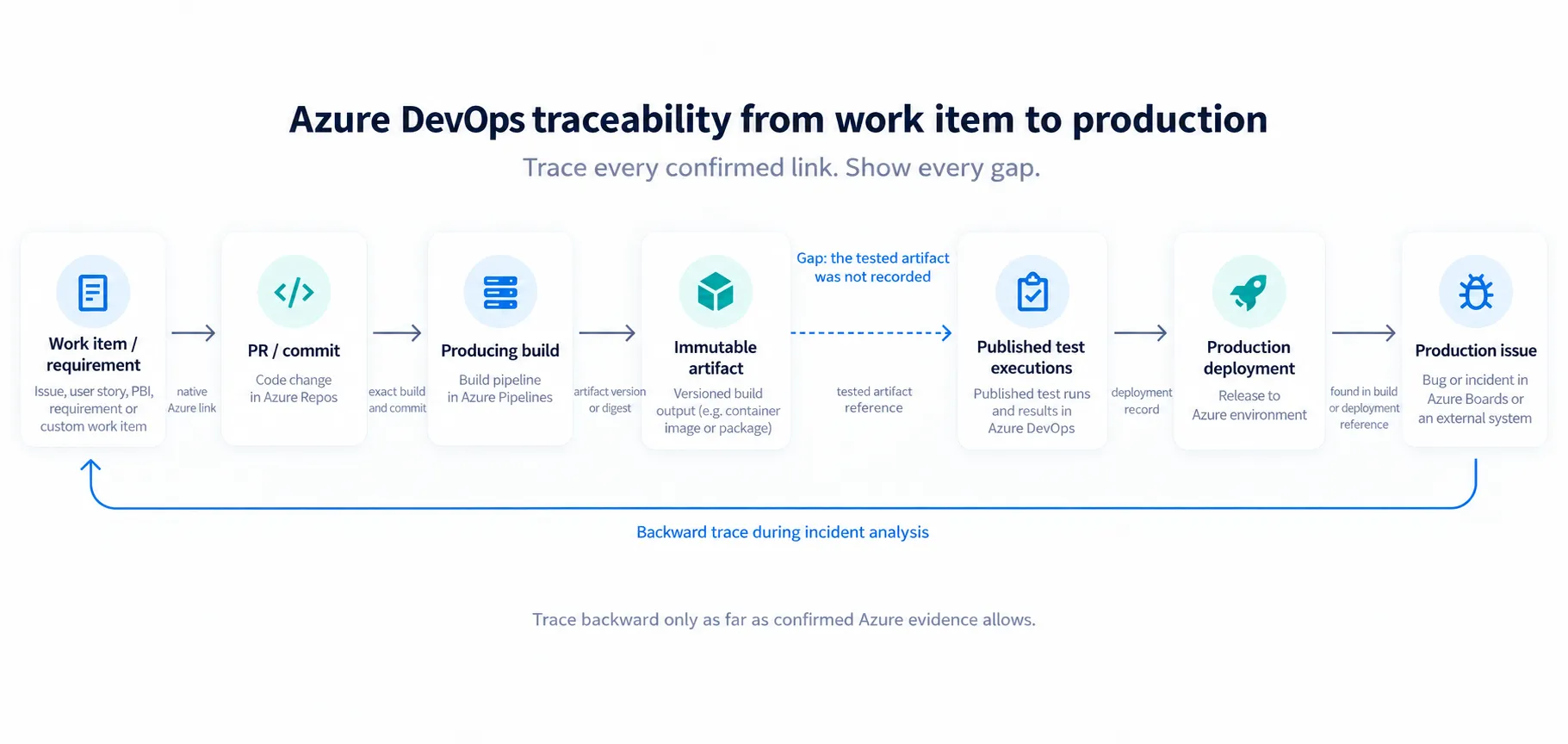
Trace every confirmed link. Show every gap. A later record cannot repair an earlier missing edge by assumption.
Traceability should not depend on one process template
Azure Boards supports Basic, Agile, Scrum, CMMI, and customized inherited processes. The backlog item representing a requirement can therefore be an Issue, User Story, Product Backlog Item, Requirement, Bug, or a custom work item type.
The name is less important than the role the item plays. A practical traceability model
asks whether the item is an eligible product requirement in the selected scope, not
whether its type is literally User Story.
| Team setup | Typical requirement item | What traceability still needs |
|---|---|---|
| Basic | Issue | Stable item ID, change links, release evidence, tests |
| Agile | User Story | The same chain, regardless of board state names |
| Scrum | Product Backlog Item | The same chain, without assuming every team uses sprints identically |
| CMMI | Requirement | The same chain, with the formal history preserved |
| Custom or waterfall-inspired workflow | Custom requirement type or staged item | Explicit mapping of eligible types and states |
Microsoft documents the process differences in its Azure Boards process guide. A reporting tool should discover or configure the relevant types. It should not hardcode one methodology as the definition of good traceability.
What Azure DevOps provides
Azure DevOps already has useful native links:
- work items can link to branches, commits, pull requests, builds, test results, and other work items
- a build records its source version and can expose associated changes and work items
- YAML pipeline resources identify the producing pipeline and the resource version consumed by another pipeline
- deployment jobs targeting Azure Environments create deployment history
- requirement-based Test Suites connect backlog requirements to Test Cases
- automated test results can be associated with requirements or Test Cases
- Bugs can retain fields such as
Found in BuildandIntegrated in Build
The underlying model is capable. Microsoft’s documentation covers work item links, pipeline resource traceability, Azure Environment deployment history, and requirements traceability.
What Azure DevOps does not do is guarantee that a team uses all those objects, or that the separate links describe the same release candidate.
Think in edges, not one end-to-end status
Traceability is a graph. Every edge should say how it was established instead of being
flattened into a single traced or not traced flag.
| Provenance | Example | Confidence |
|---|---|---|
| Native | Azure work item linked to PR; pipeline resource consumed an exact run | Confirmed by Azure |
| Configured | Reviewed mapping connects 1842:AC-01 to a stable logical test ID |
Confirmed by team convention |
| Inferred | Test and work item share a title, tag, or nearby timestamp | Candidate only |
| Unknown | No deterministic relation is available | Stop the chain here |
An edge can be native on one side and unknown on the next. A confirmed work item-to-PR link does not make an inferred test-to-artifact relation confirmed. Title similarity and AI-assisted matching can reduce search effort, but they must not silently upgrade a candidate edge.
Where the graph breaks in real teams
The ideal diagram is short:
Requirement → code change → artifact → tested artifact → deployment → production feedbackThe real flow is usually less tidy because different teams own different edges.
Missing requirement-to-change edge
A developer can complete a pull request without linking the requirement. A work item can be moved to Done because the feature was reviewed and appeared to work. Even when a link exists, automatically closing the item from a commit message can happen before testing or deployment is complete.
Branch policies can require linked work items in Azure Repos, but that is a team decision,
not a universal default. The resulting edge is still only requirement → change; it does
not prove that the acceptance criteria were tested.
Missing change-to-test edge
Many products begin with exploratory or informal manual testing. Automation arrives after the feature is already in use. The automated suite then develops its own naming, repository, pipeline, and schedule. It can become valuable while still having no structured connection to the original work items.
This is normal product evolution. The graph must preserve not mapped yet and
automation added later instead of inventing an edge or treating the whole feature as
untested.
Missing artifact-to-test edge
A developer pipeline builds payments-api 4.2.0. A nightly API suite and a browser suite
run in separate pipelines. They may use an environment URL rather than an immutable
artifact reference. If the environment changes between deployment and test execution,
the test run’s branch and commit identify the test code, not necessarily the application
version it exercised.
The operational pattern is common enough to deserve its own multi-pipeline review. For traceability, the narrow question is whether the test execution captured the exact product artifact or deployed version it exercised.
Missing deployment-to-feedback edge
If a deployment consumes “the latest successful build,” the artifact can be determined at runtime but never written into the review record. A production Bug might describe the symptom and severity without naming the deployment or exact build. Post-release analysis then depends on timestamps, team memory, and naming conventions.
Those clues are useful, but they are inference, not confirmed traceability.
What the chain looks like in a real Azure DevOps project
To verify the boundary in the product rather than describe it abstractly, we prepared a
small, synthetic NovaCart Commerce example inside Azure DevOps. The project uses the
Basic process, so the requirement is Issue #1, not a User Story or Product Backlog
Item. Its four acceptance criteria have stable AC-01 to AC-04 labels.
The work item is linked natively to branch
feature/work-item-1-payment-idempotency, commit 8cd9600, and three Test Cases through
a requirement-based suite. That is already useful traceability, and it does not depend
on Scrum terminology.
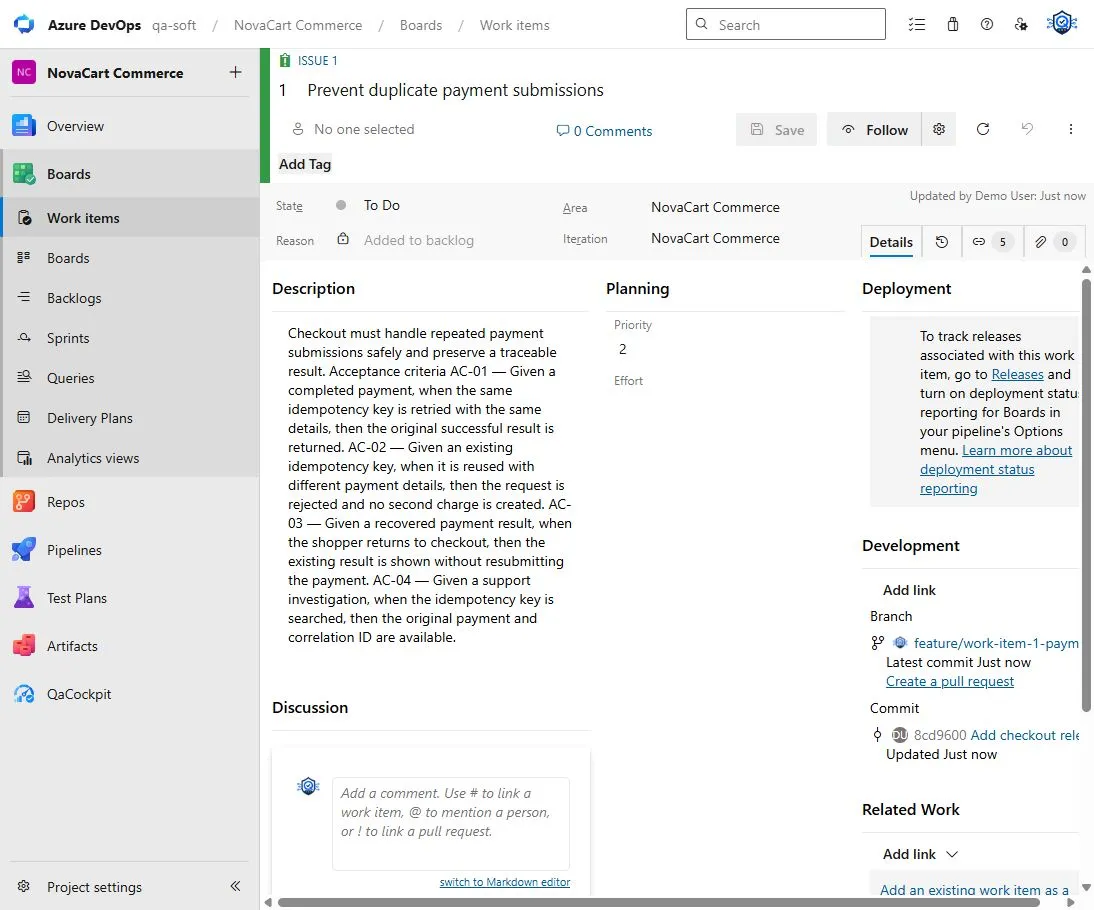
The requirement-to-change edge is confirmed by Azure. The acceptance-criteria text is still one rich-text field.
The existing Checkout API Regression run #75 records repository
qacockpit-demo-checkout-services, branch main, source SHA 89c6ff86, one retained
artifact, and a published test report. The pipeline itself succeeded while the report
contained 25 results: 22 passed, 2 failed, and 1 other/not executed.
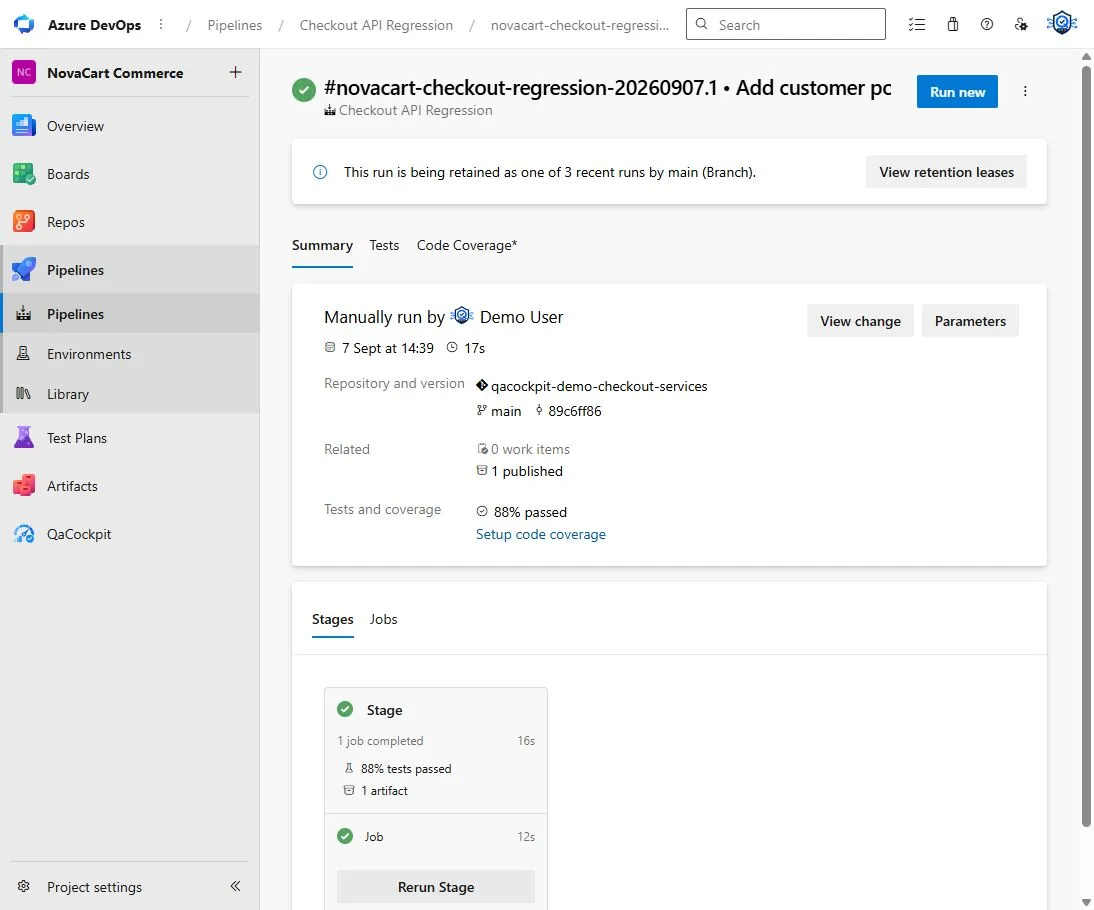
Pipeline success and test outcome are different facts. The retained artifact here is test evidence, not a proven immutable application artifact.
QaCockpit can select that exact Azure run and keep its Azure lifecycle, result intake, test outcome, repository, branch, and published result source visible together.
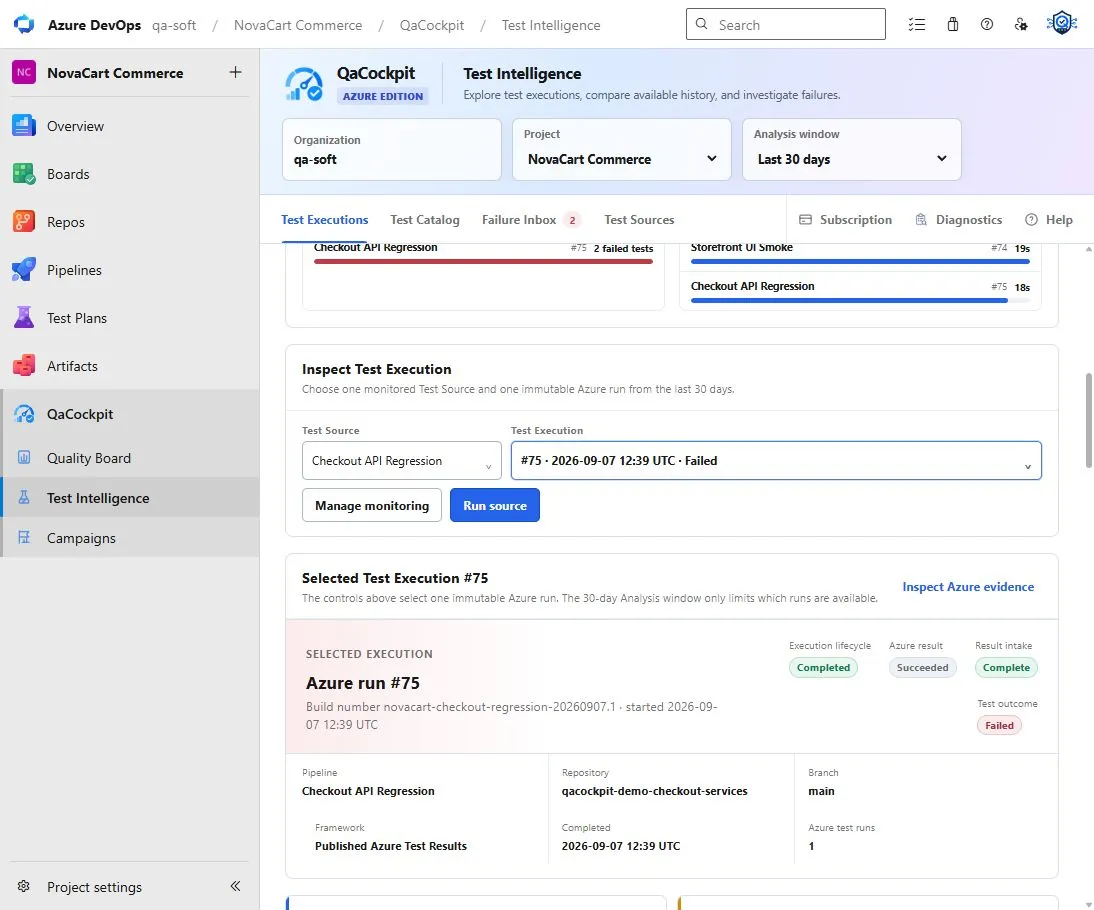
The exact execution is known. The tested application artifact and a production deployment are not recorded, so the chain stops there.
This distinction matters. We could manufacture an end-to-end-looking picture by assuming
that run #75 tested the latest application version and that the same version later
reached production. Azure contains no such evidence in this example. The honest result is
a confirmed requirement-to-change edge, confirmed published test evidence, and an
unknown artifact-to-test and artifact-to-deployment edge.
A worked example: everything passed, but the release chain is incomplete
Consider a synthetic checkout change:
- Product Backlog Item
#1842adds duplicate-payment protection - pull request
#608implements the server-side guard - developer pipeline run
#731producespayments-api 2026.09.27.3 - API regression run
#214reports 186 passed tests - browser regression run
#188reports 72 passed tests - deployment run
#91targets Production - Bug
#2240reports two duplicate charges after release
At first glance, the release had a work item, reviewed code, a successful build, 258 passing tests, a production deployment, and a recorded Bug.
The missing links change the conclusion:
| Question | Available evidence | Honest answer |
|---|---|---|
Which code implemented #1842? |
The work item is linked to PR #608 |
Confirmed |
| Which artifact contains the change? | Build #731 points to the merge commit and artifact version |
Confirmed |
Did API run #214 test that artifact? |
The run used the same environment, but no deployed artifact version was captured | Unknown |
Did browser run #188 cover duplicate submission? |
The suite passed, but no requirement or stable test mapping exists | Unknown |
| What reached Production? | Deployment #91 names the pipeline but not the immutable artifact in the review record |
Partially known |
Which release introduced Bug #2240? |
The Bug has a date, but no build or deployment reference | Inferred from time only |
The correct verdict is not “untested” and not “fully traced.” It is partial evidence,
with the exact missing links named.
Trace backwards from a production bug
Forward traceability asks whether a requirement reached production with the expected evidence. Backward traceability starts with a failure and asks what introduced it:
Production Bug #2240
  → deployment #91
  → artifact payments-api 2026.09.27.3
  → producing build #731
  → merge commit and PR #608
  → requirement #1842
  → AC-01 / AC-02
  → mapped test executions
In the synthetic example, the backward chain stops immediately if Bug #2240 has only a
timestamp. Linking it to deployment #91 recovers one edge. If the deployment retained
the consumed artifact version, the team can continue to build #731, its commit, PR, and
work item. The final hop to a specific acceptance criterion still needs the explicit
mapping described in
Acceptance-criteria coverage in Azure DevOps.
This reverse walk is often the most valuable traceability exercise. It shows exactly which missing edge slows incident analysis instead of producing a vague completeness score.
Recommended team convention: a minimum traceability contract
The following is a QaCockpit recommendation, not a feature Azure DevOps creates automatically.
Do not begin by manually linking every automated test to every work item. First preserve six stable anchors:
- Requirement anchor — the Azure work item ID and its revision or last reviewed state
- Change anchor — at least one PR or commit linked to the requirement
- Build anchor — the exact pipeline run, source commit, and immutable artifact version
- Test anchor — stable logical test IDs plus the exact test execution
- Deployment anchor — the deployment record and exact artifact or pipeline-resource version
- Feedback anchor — the production Bug or incident linked to the deployment or build when known
This contract works whether the team uses Agile, Scrum, CMMI, a custom workflow, or no formal Test Plan. It also allows gradual adoption: an unknown test-to-requirement link does not erase a confirmed artifact-to-deployment link.
Link the change once, not in every downstream object
Link the work item to the pull request or commit at the point where code changes. Azure can carry associated commits and work items through pipeline resources and deployment history when the pipeline topology supports it. Avoid asking every test author to repeat the same work item ID in dozens of places.
Make QA pipelines accept an exact product version
The strongest improvement for separate developer and test pipelines is an explicit, immutable input. The test run should preserve the artifact digest, package version, producing Build ID, or selected pipeline-resource version it exercised.
main, latest, a mutable tag, and an environment URL are useful selectors. They are not
immutable release identities. The same distinction is central to
release readiness in Azure DevOps.
Add detailed mappings only where they create value
When a team needs acceptance-criterion-level visibility, keep a small mapping beside the test code or in Test Plans. For an automation-first team, a version-controlled file can act as a portable convention:
requirement: 1842
criteria:
  AC-01:
    tests:
      - checkout.api.rejects-duplicate-idempotency-key
  AC-02:
    tests:
      - checkout.ui.shows-existing-payment-result
Azure DevOps does not interpret this file natively, and QaCockpit does not read it today. It is an example of a lightweight contract that can be reviewed with the test code and adopted without duplicating the whole suite in Test Plans.
Teams that already maintain Test Plans can instead use requirement-based suites, Test Cases, and Associated Automation. The important part is to preserve stable identities and distinguish native links from configured mappings.
Stop the chain where evidence stops
Do not infer that:
- a Done work item was tested
- a linked PR proves every acceptance criterion was implemented
- the latest successful test run exercised the deployed artifact
- matching branch names identify the same application version
- a green pipeline means all required test sources reported results
- a production Bug belongs to the nearest deployment by timestamp
Each conclusion needs its own evidence edge. If a selected source did not publish results, record that gap instead of turning it into a passing zero; the same rule is explained in the missing-test-evidence guide.
How QaCockpit uses this evidence
QaCockpit for Azure DevOps currently reads accessible pipelines, exact executions, published test results, retained diagnostic evidence, and selected report scope. It can show missing or incomplete test evidence without converting it into a healthy zero.
It does not currently read Azure Boards, Azure Repos, Test Plans requirement links, or Azure Environments for end-to-end work-item traceability. Future requirements and acceptance-intelligence capabilities remain a product direction, not currently shipped features or commitments to final feature names. They will require separately approved permissions, implementation, and real-host verification.
The design direction is to follow confirmed Azure links and accepted team conventions,
show provenance for every relation, and preserve unknown, inaccessible, and expired
as distinct states. QaCockpit should not guess a complete chain from names or timestamps.
An adoption sequence for one release
Start with one release path, not the entire organization:
- Choose one product change and identify its requirement work item
- Link its PR or commit without automatically closing the item too early
- Record the exact build and immutable artifact version
- Pass that exact version into the relevant QA pipelines
- Publish stable test IDs and the exact test execution
- Record the production deployment against the consumed artifact
- Link any production Bug to the deployment or build when evidence exists
- Mark every missing relation as unknown rather than inventing a match
- Review whether Test Plans or a lightweight repository mapping fits the team
- Repeat only after this first chain can be reconstructed by someone outside the team
The goal is not administrative perfection. It is a defensible answer to what changed, what was tested, what was deployed, and where the evidence stopped.
Frequently asked questions
Does Azure DevOps provide end-to-end requirements traceability?
It provides many native edges across work items, code, builds, tests, and deployments. The chain is end to end only when the team’s actual pipeline topology records compatible identities across every required edge.
How do I know which tests ran against a specific artifact?
Make the QA pipeline accept an immutable product version and retain that value with the
test execution. A branch, environment URL, or latest tag does not prove which artifact
was exercised.
Can I trace a production bug back to a work item?
Yes, when the Bug identifies the deployment or build and the downstream records preserve the artifact, source commit, PR, and work-item links. Where one edge is missing, report the remaining chain as unknown rather than matching by timestamp.
Do I need Azure Test Plans for traceability?
No. Test Plans is useful for requirement-based suites, Test Cases, and planned testing. Automation-first teams can retain stable test IDs and reviewed mappings in version control, provided the exact executions and tested artifact are also recorded.
Documentation and the Azure DevOps example checked on October 1, 2026.