
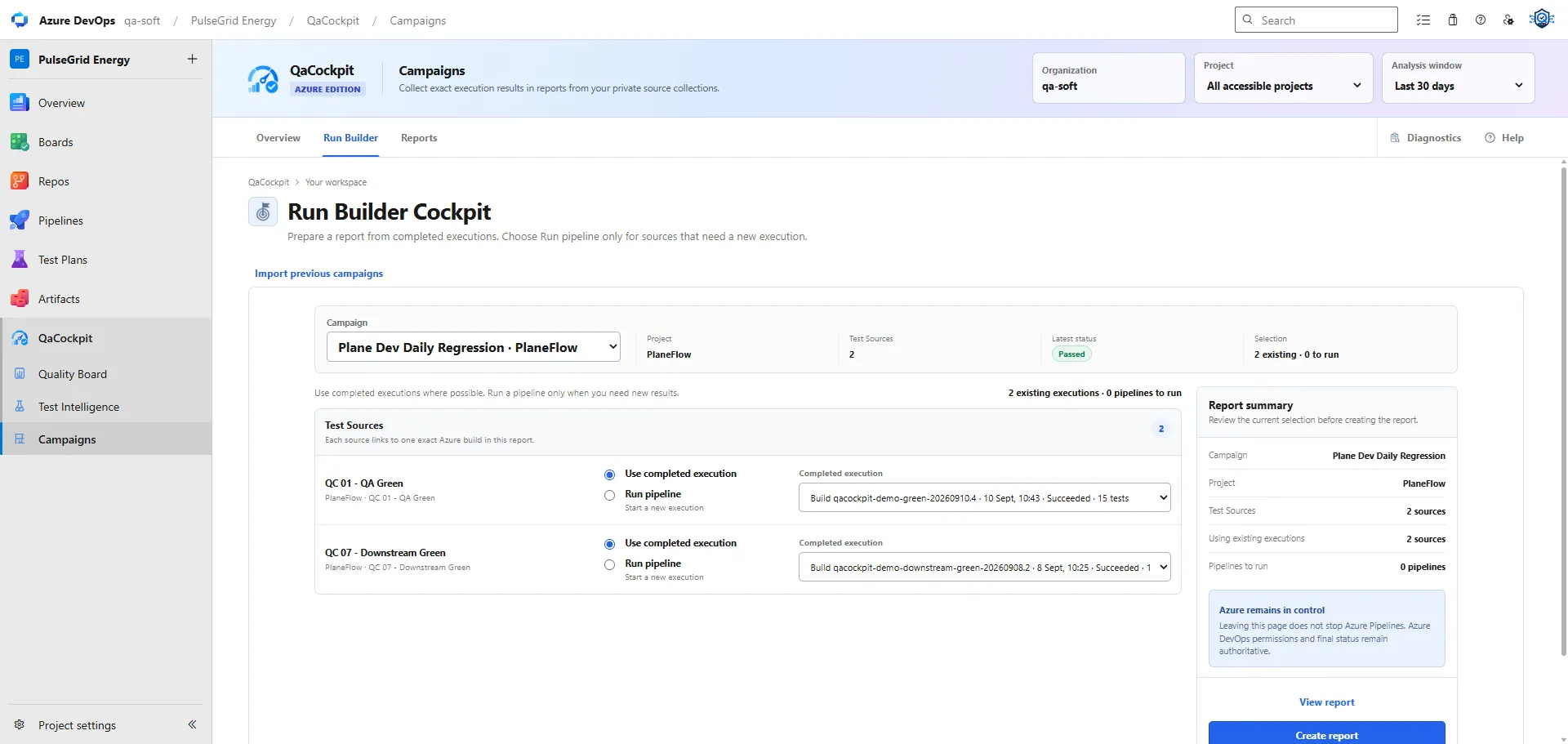
A business regression often spans several Azure DevOps pipelines. UI automation may run after deployment, API suites may validate multiple services, and integration tests may need shared infrastructure. The release needs all of them, but no individual pipeline owns the complete decision.
Organizing that work starts with a regression scope that sits above pipeline boundaries while preserving every pipeline as the execution source of truth.
Define the required regression sources
List the evidence streams the release needs before choosing runs. Each Test Source should have a stable purpose, owner context, and provider identity.
For example:
| Test Source | Azure pipeline | Purpose | Required evidence |
|---|---|---|---|
| Web critical paths | portal-playwright |
Customer journeys | JUnit, trace on failure |
| Public API regression | api-rest-assured |
Contract and behavior checks | JUnit, safe request log |
| Payments integration | payments-integration |
Cross-service behavior | JUnit |
| Deployment smoke | release-smoke |
Deployed environment verification | JUnit, deployment context |
Do not define a source as “everything in repository A” when only one pipeline and suite contribute to the release. Do not merge two independent result streams merely because they share a YAML file.
The source list should answer what evidence is required, not which pipeline happened to run most recently.
Reuse a source selection and choose exact executions
In QaCockpit for Azure DevOps, My campaigns saves a personal collection of sources from accessible projects in the same Azure DevOps organization. Each report selects exact executions for those sources. Other users keep their own campaigns and reports.
Use completed executions by default, including failed executions when they are the right evidence for the release. Choose Run pipeline explicitly only for sources that need fresh results. Opening the report builder does not start any pipelines.
Before creating the report, review each source’s project, pipeline, execution, branch, commit and timing. Choosing the latest available run is a starting point; the team still decides whether it belongs to the intended release.
Configure execution dependencies in Azure Pipelines
Use native Azure Pipelines stages and dependencies when one job must finish before another can run. For example, deployment may need to complete before browser tests start, while independent API suites can run in parallel.
My campaigns selects execution evidence for a private report. Its optional Submit together and Submit one by one modes control queue requests; they do not wait for a pipeline to finish before submitting the next one. Closing the extension does not create a background coordinator for dependent stages.
Keep the intended dependency graph in Azure Pipelines and use the campaign report to review the resulting evidence across sources.
Preserve every attempt
Rerunning a failed source should create another attempt, not overwrite the first one. The regression record needs to show:
- the original run and outcome
- why a rerun occurred
- the exact Azure DevOps run for each attempt
- whether the later pass used the same commit, environment, and parameters
- which attempt contributes to the final Campaign view
- whether repeated failure history remains available
A release may decide to accept the latest successful attempt, but the earlier failure is still part of the quality history. Removing it makes instability invisible.
Make missing sources first-class
There are several ways a source can be absent:
- it was never started
- its pipeline is still running
- the pipeline completed but no structured report was published
- only part of the report or one shard arrived
- the result was rejected as invalid
- access to the run or evidence was lost
- the source was removed from the template after the Campaign began
These states should not become 0 tests, 0 failures. A combined report must show the
source as awaiting, partial, missing, invalid, or inaccessible according to the observed
fact.
List every required source in the campaign. Treat full expected-test and shard checks as additional team verification; the current extension does not infer their completeness from the number of source reports.
Build one combined report from exact executions
A campaign report records the selected execution identities and preserves source-level detail. Reopening or exporting it reads evidence currently available to the user in Azure DevOps. Retention and permission changes can make earlier evidence unavailable.
The summary can show:
- total passed, failed, skipped, and error outcomes
- number of required sources reported, partial, missing, or still running
- source-report completeness, with any additional suite or shard checks performed by the team
- environment, branch, commit, and release context
- current failure clusters or accepted conditions
- next actions and owners where supported
Follow each available result back to its source and exact execution. PDF download lets the user keep a report file; it does not provide a live shared campaign or an independent archive of Azure evidence.
A practical Campaign review
Before treating the regression as complete, ask:
- Does the Campaign contain every required Test Source?
- Were execution dependencies configured and satisfied in Azure Pipelines?
- Did all parallel sources reach a terminal state?
- Did each source publish a usable result?
- Has the team checked the expected suites and shards beyond source-report counts?
- Are reruns visible as separate attempts?
- Can every failure and gap be opened in exact execution context?
- Do the selected executions match the intended release, and is the evidence still available?
This creates one release-level answer without moving test execution away from Azure DevOps.
Read the broader guide to regression campaigns without replacing CI and the Azure extension Campaign documentation.