
A requirements traceability matrix can be useful. It can also become a stale spreadsheet that repeats information already held in Azure DevOps.
The difference is not the file format. It is the job the matrix must do.
Use a matrix when you need a controlled answer for a defined scope: which requirements were included, which tests support them, what result was observed, which gaps remain, and who accepted the residual risk at a particular time. Use live Azure DevOps links when the team needs to investigate current work, follow a Test Case into its latest run, or see a new result without rebuilding a document.
The strongest approach often uses both. Azure DevOps remains the operational source of evidence. The matrix is a governed snapshot produced from that evidence for a specific review, audit, handover, or release decision.
What a requirements traceability matrix should answer
A useful RTM is more than a two-column list of requirement IDs and Test Case IDs. For one explicit scope, it should answer:
- Which requirements are eligible for this review?
- Which Test Cases have an accepted relationship to each requirement?
- Which of those Test Cases belong to the selected test or release scope?
- Which manual and automated results were actually observed?
- Which evidence is missing, inaccessible, stale, or failed?
- Which build, branch, commit, environment, and time does the result describe?
- Who owns each unresolved gap and the final decision?
If the matrix cannot name its scope and timestamp, readers cannot tell whether an empty
cell means not linked, not planned, not executed, not visible, or simply not refreshed.
What Azure DevOps already links natively
Azure DevOps can maintain a live graph of delivery evidence:
- work items connect to branches, commits, pull requests, builds, and deployments
- the
Tested By/Testslink connects requirements-category work items and Test Cases - requirement-based suites place linked Test Cases in a Test Plan scope
- associated automated tests connect a Test Case to a test method
- Test Runs and pipeline results retain observed outcomes and investigation details
Microsoft’s Test objects overview describes the requirement, suite, Test Case, and development relationships. The Azure Test Plans overview also explains requirement quality and end-to-end traceability.
These links are more useful than a manually maintained matrix for daily work because a developer or tester can open the owning object. A failed result can lead to its run, stack trace, branch, and pipeline. A missing relationship can lead to the requirement or Test Case that needs correction.
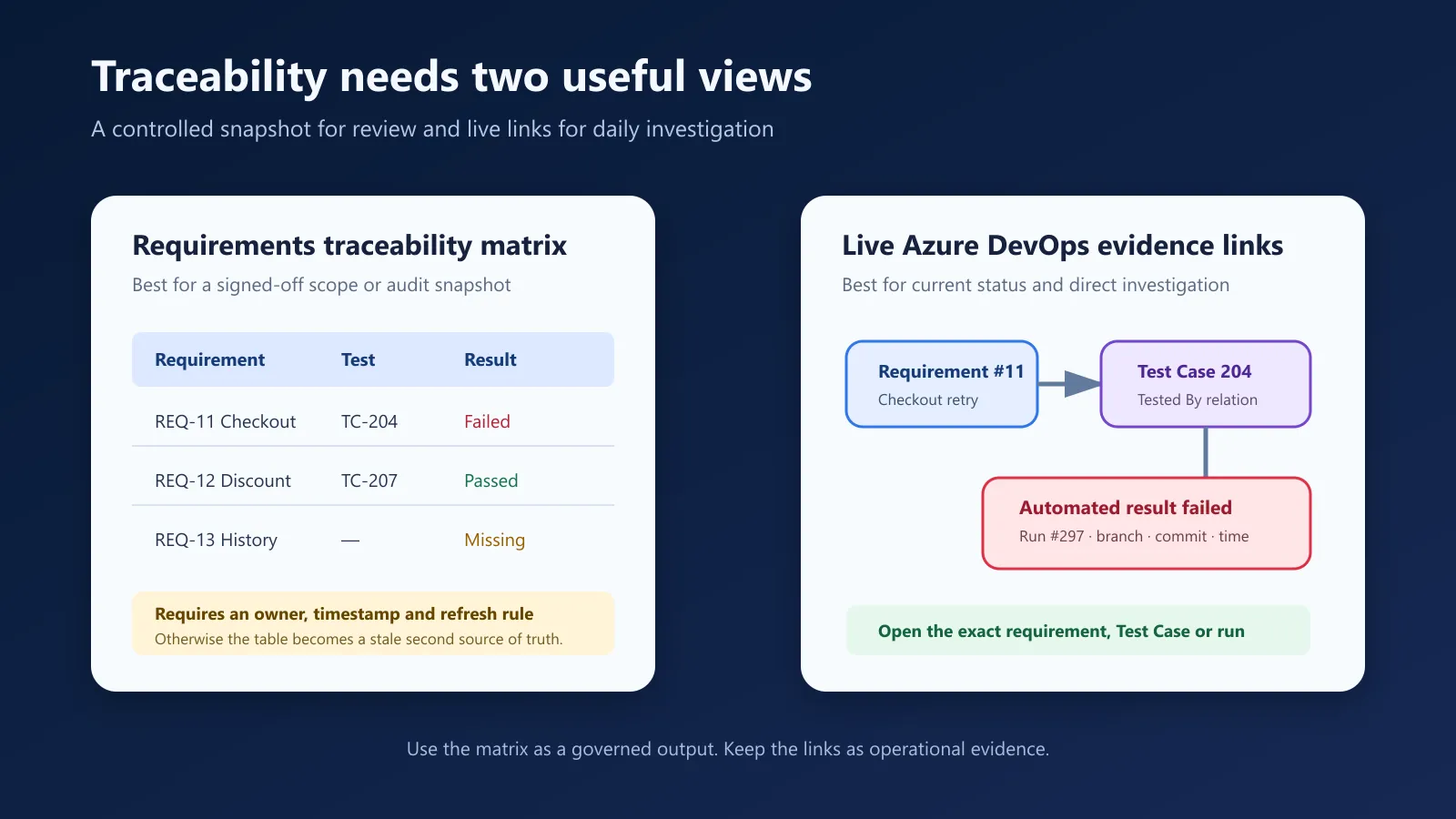
Treat the matrix as a controlled output. Keep native links as the operational evidence.
When the matrix is the better view
Create a matrix when at least one of these conditions applies.
A reviewer needs one bounded baseline
An audit, contractual acceptance, regulated release, or customer handover may require a fixed record. The reviewer needs to know what was true at the decision point, even if Azure data changes later.
Record the query or release scope, the export time, the evidence window, and the owner of the snapshot. Do not present a current Azure screen as proof of an earlier state unless the underlying evidence is immutable.
Evidence crosses systems
The requirement may live in Azure Boards while a security assessment, external approval, manual exploratory note, or supplier result lives elsewhere. A controlled matrix can join those references without pretending that Azure owns every artifact.
Use stable IDs and links. Do not paste large evidence bodies into cells.
The decision needs explicit gap ownership
A matrix can add decision fields that native links do not provide automatically:
| Requirement | Required evidence | Observed evidence | Gap | Owner | Decision |
|---|---|---|---|---|---|
| REQ-11 | TC-204 in release plan | Run #297 failed | Product or test issue | Payments team | Investigate |
| REQ-12 | TC-207 automated | Run #297 passed | None observed | Checkout team | Accept evidence |
| REQ-13 | At least one Test Case | No linked Test Case | Design gap | QA lead | Add test design |
The decision column should not convert missing evidence into a pass. It records what the reviewer decided to do about the gap.
When live Azure DevOps links are better
Do not create a parallel matrix merely to browse current data.
Use native links and queries when the team needs to:
- find requirements without Test Cases
- open the Test Cases connected to a requirement
- see whether a Test Case belongs to a selected Test Plan
- inspect the latest manual or automated result
- follow the result into its exact run or pipeline
- see new evidence without waiting for another export
Azure DevOps supports direct-links queries for linked work items. Requirement-based suites create the relationship used by requirement tracking for manual execution. Microsoft notes this boundary in its requirements tracking report documentation: manual requirement association depends on a requirement-based suite.
That detail matters. A Test Case found by a broad query is not automatically planned for the release, and a Test Case with an automated association is not proof that its method ran in the selected build.
Build the matrix from states, not empty cells
Use explicit states for every evidence dimension.
| Dimension | Useful states |
|---|---|
| Requirement–Test Case relation | Linked, missing, unknown |
| Selected Test Plan | In plan, outside plan, not evaluated, inaccessible |
| Manual execution | Passed, failed, not executed, unknown |
| Automation association | Confirmed, missing, not applicable, unknown |
| Automated execution | Passed, failed, no recent result, partial read, unknown |
Manual and automated outcomes should remain separate. If a Test Case is automated, a team may intentionally stop repeating the same check manually. That choice should not look like missing execution.
Likewise, No Test Plan selected means planning was not evaluated. It does not mean every
linked Test Case is outside the plan.
A practical Azure DevOps workflow
- Define one project and one saved Boards query for the requirement scope.
- Resolve requirements through the process-neutral Requirements category rather than
hard-coding
User StoryorProduct Backlog Item. - Read exact
Tested Byrelations and retain the linked Test Case IDs. - If planning matters, choose one Test Plan and compare the linked Test Cases with that plan’s suites and points.
- Keep completed manual points separate from automated results.
- Match automated results only through a confirmed Test Case association.
- Retain the Test Run, build, branch, commit, time, and any partial-access warning.
- Generate the matrix with its scope, timestamp, owner, and refresh rule.
This process preserves provenance. It also makes every aggregate drillable into exact items instead of turning traceability into a percentage with no rows behind it.
Common RTM failure modes
Copying titles without IDs
Titles change and can repeat. Use stable work item, Test Case, run, and build IDs.
Treating a link as a result
A requirement linked to a Test Case has test-design evidence. It does not yet have execution evidence. Keep test design, automation, execution coverage, and pass rate separate.
Treating the latest result as the release result
The latest run may be from another branch, build, or environment. Select the exact release context before copying an outcome.
Hiding partial access
An account may see the requirement but not the Test Plan or run. Unknown is more accurate
than zero and safer than pass.
Maintaining two sources of truth
Do not let reviewers edit relationships only in the spreadsheet. Correct the Azure link or the external evidence source, then regenerate the snapshot.
How QaCockpit approaches the boundary
The public QaCockpit for Azure DevOps release shows pipeline and test evidence available to the signed-in user. We are testing a private Traceability Intelligence pilot that can use an explicit saved Boards query or a team, iteration, or parent scope together with an optional Test Plan, linked Test Cases, and recent results. That pilot is not a public Marketplace capability yet.
The product direction is the same as the method in this guide: preserve each evidence dimension, keep unknown and partial states visible, and open the exact Azure item behind a signal. An export may later provide a controlled RTM view, but it should not replace the live relationships.
Review checklist
Before approving a traceability matrix, ask:
- Is the requirement scope explicit and reproducible?
- Does every relationship use a stable ID and accepted provenance?
- Are planning, manual evidence, automation association, and automated results separate?
- Can a reviewer open the exact requirement, Test Case, run, and build?
- Are missing, failed, stale, inaccessible, and unknown states distinct?
- Does the snapshot have an owner, timestamp, and refresh rule?
- Is residual risk recorded as a decision rather than disguised as coverage?
Microsoft documentation was checked on October 22, 2026.