

Playwright JUnit reporting turns a browser-test run into portable structured results that CI/CD and downstream reporting tools can understand. It records test identities, durations, outcomes, and failure output in JUnit-style XML.
That is an important hand-off, but it is not the complete reporting system. The XML must survive a failed CI run, remain attached to the exact execution, and stay connected to the screenshots, traces, video, and logs that explain what happened.
The practical goal is not merely to generate junit.xml. It is to let an engineer open a
failed execution and form a useful diagnosis without rerunning the test just to recover
missing context.
Give every evidence type one clear job
Playwright can produce several outputs from the same run. They serve different audiences and should not be forced into one format:
| Evidence | Best use |
|---|---|
| Console reporter | Fast feedback while the test is running locally or in CI |
| JUnit XML | Portable test identity, status, duration, failure text, and captured output |
| HTML report | Human exploration of one Playwright run |
| Trace | Step-by-step browser, network, DOM, action, and timing diagnosis |
| Screenshot and video | Visual evidence of the observed failure state |
| Application and test logs | Domain events and technical context that explain the path to failure |
JUnit is the normalization boundary. It allows Playwright results to enter the same release view as API, integration, and unit-test results produced by other frameworks. Playwright-native artifacts preserve the richer browser-specific detail.
Configure the reporter once
Playwright includes a built-in JUnit reporter. A CI-oriented configuration can keep readable console output, portable XML, and the native HTML report at the same time:
import { defineConfig } from '@playwright/test'

export default defineConfig({
  reporter: [
    ['line'],
    ['junit', { outputFile: 'artifacts/junit/playwright-junit.xml' }],
    ['html', { outputFolder: 'artifacts/html-report', open: 'never' }],
  ],
  use: {
    screenshot: 'only-on-failure',
    video: 'retain-on-failure',
    trace: 'retain-on-failure',
  },
  outputDir: 'artifacts/test-results',
})
The official Playwright reporter contract also supports environment variables such as
PLAYWRIGHT_JUNIT_OUTPUT_FILE and the includeProjectInTestName option. Set the output
path explicitly whenever another process needs to retain or import the file. Otherwise a
JUnit report can be written to standard output instead of becoming a durable artifact.
When several Playwright projects represent different browsers or environments, preserve that dimension consistently. Including the project in a test name can make a combined file unambiguous, but changing the naming rule later also changes downstream test identity. An alternative is to keep the browser or project as stable execution context.
Retain the report when tests fail
The most valuable report often comes from a failing run. A common pipeline mistake is:
- run
npx playwright test; - receive a non-zero exit code;
- stop the job before the artifact step;
- lose the JUnit file and diagnostic evidence.
Artifact retention must run regardless of the test-command outcome while preserving the original failure as the final job result.
The expression differs by provider, but the contract does not:
- GitHub Actions commonly runs the upload step with
if: always(); - Azure Pipelines commonly publishes results and artifacts with
condition: always(); - another CI/CD provider should offer an equivalent finally/always step.
Retain the XML, screenshots, traces, video, and HTML report under a unique artifact name. Do not let the upload command turn a failed test run into a successful pipeline, and do not publish secrets captured from the browser session.
The complete provider examples live in the GitHub Actions JUnit guide and Azure DevOps integration guide for QaCockpit Cloud.
Treat shards and retries as real execution structure
Parallelism makes a fast suite easier to run and a report easier to corrupt accidentally.
For matrix jobs or shards:
- write one JUnit file per shard or collect files in shard-specific directories;
- use a unique CI artifact name for every job;
- retain every report rather than allowing the last job to overwrite a shared path;
- keep the Playwright project, shard, provider run, and attempt available as context;
- merge only artifacts that belong to the same logical execution.
Retries also matter. A failed first attempt followed by a pass is not identical to one clean pass. The run may contain useful instability evidence even when the final CI status is green. Reporting should preserve attempts instead of rewriting the history into the last observed outcome.
Make CI diagnostics feel like local diagnostics
A report that says only checkout test failed forces the engineer to recreate the run.
Useful automation should explain the route to failure as clearly in CI as it does during
local development.
That means designing diagnostics alongside assertions:
- give
test.stepblocks names that describe meaningful user or system actions; - keep safe request identifiers and application events in structured logs;
- capture expected and actual values without dumping credentials or customer payloads;
- attach the browser evidence generated by the same attempt;
- preserve stdout and stderr when they add diagnostic value;
- keep environment, commit, browser, and run identifiers beside the result.
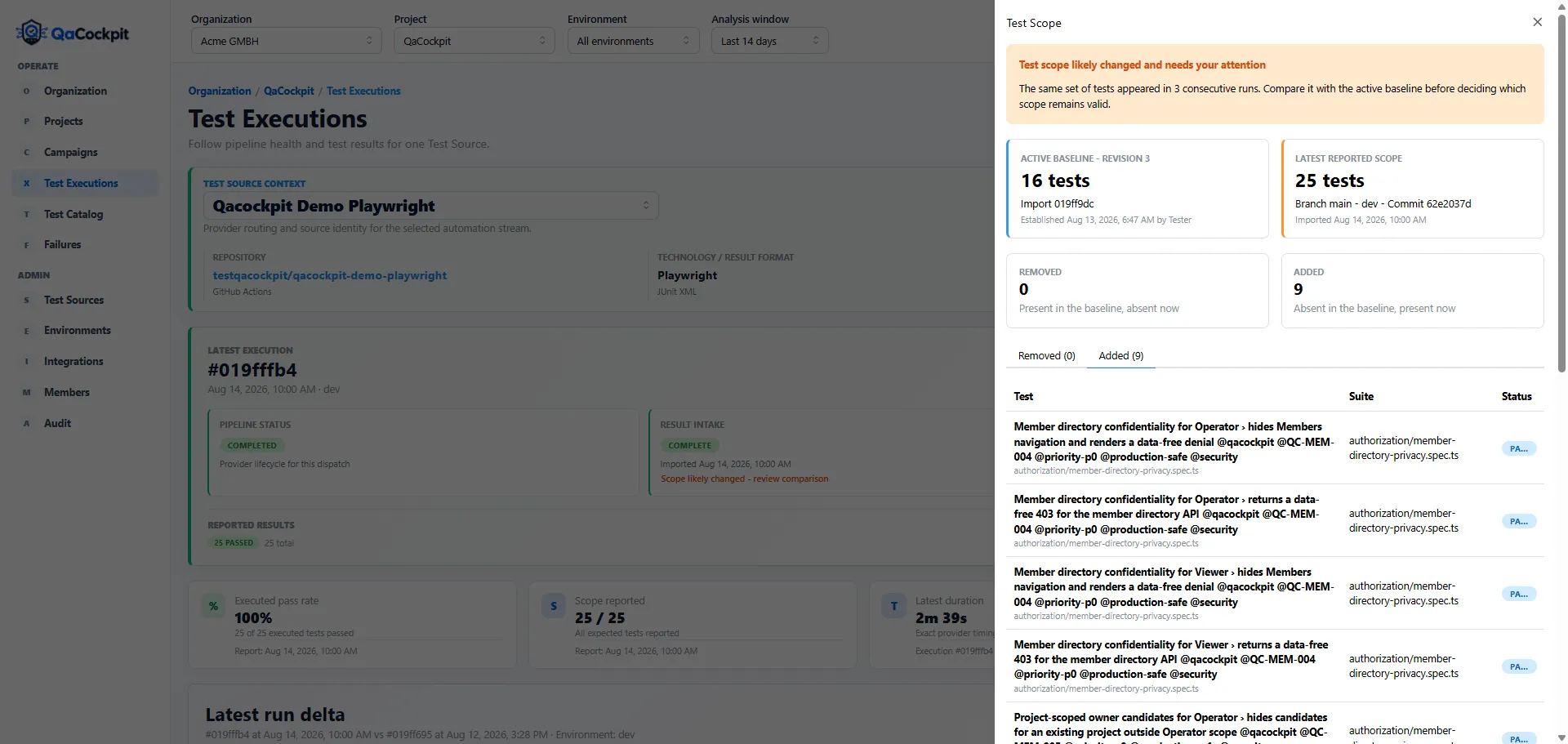
Stable test identity makes Playwright output useful beyond one run: the team can see whether the expected suite changed, not only whether the observed tests passed.
The target is a first useful hypothesis without a rerun. Some failures will still require reproduction, but missing logs or an expired trace should not make reproduction the default first step.
Why teams end up building custom reporting applications
One Playwright repository can often live comfortably with its HTML report and CI artifact page. The pressure to build custom tooling appears when an organization needs to:
- collect Playwright results from several repositories;
- combine them with API, unit, integration, or mobile suites;
- preserve history beyond CI artifact retention;
- correlate results with exact releases and environments;
- normalize retries, shards, and framework-specific output;
- protect artifacts and enforce access;
- show failures and missing results to people outside the owning test team.
At that point, the internal tool is no longer “a page that parses XML.” It needs ingestion, identity, storage, authorization, retention, correlation, dashboards, and operational maintenance. Those are valid engineering problems, but they compete with the product the team intended to test.
QaCockpit Cloud keeps Playwright and CI/CD as the execution layer. It uses the retained JUnit and artifacts as evidence, then connects that source with the other automation required for the release.
JUnit is the bridge, not the destination
A durable Playwright reporting flow has five parts:
- Playwright executes the browser tests.
- JUnit XML records portable structured outcomes.
- Native artifacts preserve the diagnostic depth.
- CI/CD retains all evidence from the exact attempt, including failures.
- A reporting layer connects that run to history, expected scope, failures, and the other Test Sources involved in the release.
Start with the Playwright evidence guide and inspect the public qacockpit-demo-playwright repository for controlled green, failed-test, and scope-drift runs. Then see how a Failure Inbox turns repeated failures into owned work. The screenshots and provider setup guides above describe QaCockpit Cloud. The Azure DevOps extension has its own setup and uses evidence subject to Azure retention. Teams operating Playwright across several Azure DevOps projects or pipelines can also explore QaCockpit for Azure DevOps.