
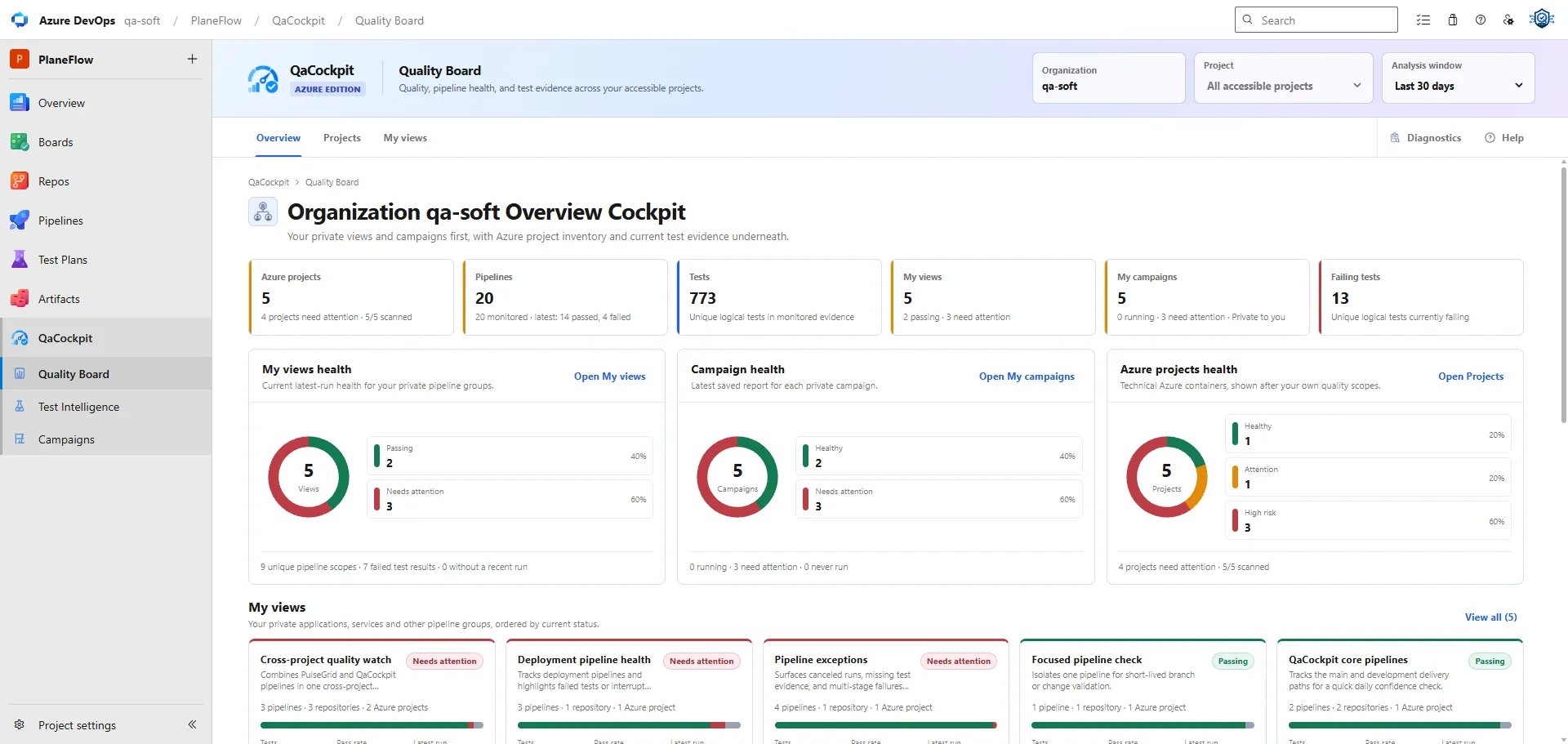
QaCockpit for Azure DevOps is now publicly available from the Visual Studio Marketplace. The extension is published by Vorgan and brings a connected view of automated test evidence into Azure DevOps without replacing the pipelines and test frameworks teams already use.
The initial Marketplace release includes a 60-day evaluation for each Azure DevOps organization. It does not require a payment method, does not start a paid subscription, and does not renew automatically. Paid access is planned as a separate future step; the current release is intended to let teams evaluate the product with their existing Azure DevOps projects and pipelines first.
Why we built the Azure DevOps extension
Azure DevOps already provides detailed information about individual pipelines, runs and test results. The harder question appears when a product or release depends on several projects and pipelines:
- Which sources reported current test evidence?
- Which pipelines completed without publishing usable results?
- Where are the failures that need investigation now?
- Which exact executions support the regression report?
- Is the evidence current, complete and connected to the intended branch or commit?
QaCockpit organizes those facts into one navigable product surface. It does not declare a release ready or replace the team’s risk decision. Each summary stays connected to the underlying Azure DevOps source, pipeline, run, branch, commit and available test results.
Start with Quality Board
Quality Board provides the first organization-level picture. It combines accessible Azure projects with the user’s private views and campaign reports, then highlights source freshness, failures, missing evidence and recent activity.
Teams can create My views to group the pipelines they want to follow across accessible projects. A view can represent an application, service, deployment path or another scope that makes sense for the organization. QaCockpit does not impose a fixed hierarchy on the team’s Azure DevOps structure.
The result is a faster route from an organization-wide signal to the project, pipeline or execution that explains it.
Follow the evidence through Test Intelligence
Test Intelligence connects four working areas:
- Test Executions for monitored source health and exact Azure runs;
- Test Catalog for logical test history and implementation context;
- Failure Inbox for current failures and repeated patterns;
- Test Sources for the pipelines included in the analysis.
Failure Inbox keeps Azure test outcomes separate from the user’s personal investigation workflow. Status, Classification and Owner are labelled Private to you in this first public release and are stored in personal Azure DevOps Extension Data. They are not a shared team assignment system.
QaCockpit reads evidence available through Azure DevOps Test Run and Result APIs, with bounded recovery from compatible retained JUnit artifacts. Azure DevOps remains the system of record. If a run or result is removed by retention or becomes inaccessible, a QaCockpit link does not turn it into an independent archive.
Prepare reports from exact executions
Campaigns lets each user save private collections of Test Sources and prepare reports from exact selected executions. Existing completed executions are the default. Starting a new pipeline is an explicit per-source choice and follows the signed-in user’s native Azure permissions.
Campaign reports preserve the selected execution identities, source-level outcomes and available evidence links. They can be exported to PDF for local use, but the PDF is not a shared online archive. QaCockpit also does not orchestrate dependent pipeline stages; those dependencies remain in Azure Pipelines.
Access and data boundaries
The normal extension flow uses the signed-in Azure DevOps identity. It does not require a separate QaCockpit Cloud workspace or a personal access token. Extension scopes and the user’s effective project and pipeline permissions both constrain what can be read, queued or canceled.
Pipeline names, project names, test names and test results are not sent to the QaCockpit licensing service. That narrow service processes the Azure organization identifier, evaluation contact and consent, entitlement state, and later the minimum state needed for billing. Product-usage telemetry is disabled in the initial release.
QaCockpit for Azure DevOps currently supports Azure DevOps Services at dev.azure.com.
Azure DevOps Server is not supported in this release. QaCockpit Cloud remains a separate
hosted edition for organizations that need one quality layer across GitHub Actions and
Azure DevOps.
Start the evaluation
Before installing, review the publisher, requested scopes, Privacy Policy, Terms and pricing information on the Marketplace page. An Azure DevOps organization administrator must approve the installation. After installation, open the QaCockpit group in a project and follow the activation flow for the organization evaluation.