
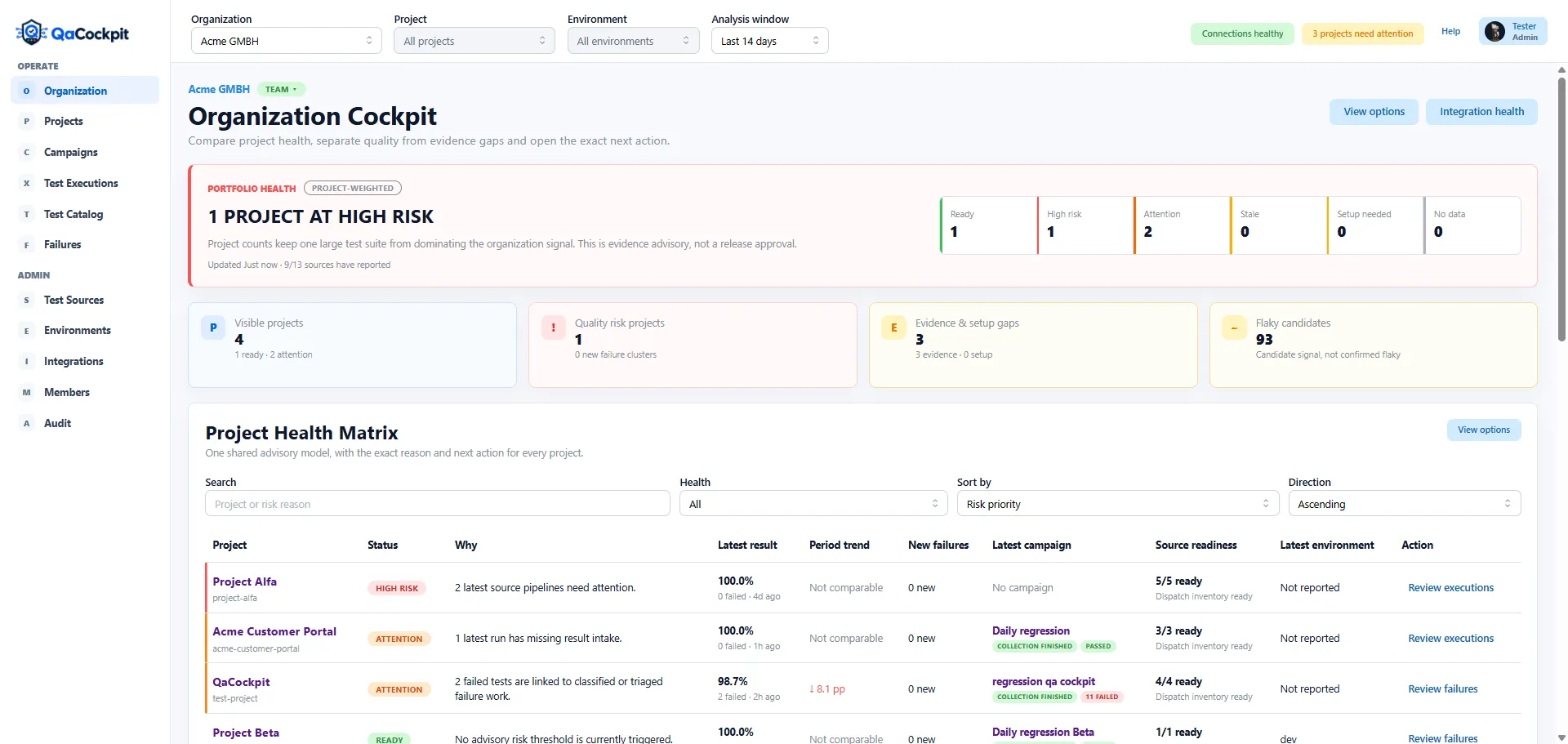
Illustration: QaCockpit Cloud. Final Azure DevOps extension screenshots will accompany the public release.
Azure DevOps projects create useful boundaries for teams, permissions, repositories, and delivery work. Those same boundaries make organization-level test reporting difficult. An Engineering Manager or QA Lead may be responsible for several projects while every test result remains visible only inside its local pipeline context.
The goal is not to flatten all projects into one pass rate. It is to see which projects need attention and retain enough context to understand why.
Project boundaries are meaningful
Two Azure DevOps projects can use different:
- release rhythms and environments;
- pipeline structures and test frameworks;
- definitions of required regression scope;
- result-retention practices;
- ownership and access models;
- levels of automation maturity.
That makes a direct sum misleading. A project with 20,000 fast unit tests can dominate an organization pass rate while another project is missing its only release-critical browser suite. Ten failures in one project may be understood and accepted; one new unclassified failure in another may block the next release.
Organization reporting should preserve the project as the first decision boundary.
Start with project health, not test volume
A useful organization view answers:
- Which projects are healthy, need attention, or are high risk?
- Which projects have stale or missing evidence?
- Which required Test Sources failed to report?
- Where are new failures and those awaiting investigation concentrated?
- Which project has an active release or regression collection?
- What exact source or execution explains the state?
Project health should be a bounded policy derived from visible evidence, not an unexplained score. The reader should be able to move from the organization signal to the Project Cockpit and see the facts that produced it.
Treat Test Sources as the bridge
An Azure DevOps project is too broad to be the unit of test reporting. A pipeline run is too narrow. A Test Source connects the two:
- it belongs to an Azure DevOps project accessible to the signed-in user;
- it identifies one automation and result stream;
- it preserves the provider pipeline/run context;
- it identifies a visible Azure Pipeline and the evidence available from its runs;
- it contributes evidence to project and Campaign views.
This allows one project to depend on UI, API, integration, and smoke-test sources without pretending they are one pipeline. It also lets the organization view explain whether the problem is a failed source, a stale source, or a source that never reported.
Freshness is part of quality reporting
A successful result from last month should not silently represent today’s project. Every organization-level view needs a freshness rule that makes age visible.
Freshness depends on context. A nightly regression may become stale after a day or two. A weekly compatibility suite has a different expected cadence. A release Campaign has a fixed collection window rather than a rolling latest result.
The important part is that the policy is explicit. The dashboard should not select the latest successful run when a newer failed or missing-evidence execution exists, and it should not hide a source merely because it has never reported.
Separate current state from trend
Current state tells the operator what needs action now. Trend helps the manager understand whether the quality operation is improving.
Useful current signals include:
- project health and evidence freshness;
- current failed/error outcomes;
- results missing or partial;
- required-source coverage;
- failure clusters awaiting investigation;
- active Campaign state.
Useful historical signals include:
- how many projects occupied each health state over time;
- repeated failure concentration;
- time spent waiting for required evidence;
- source reliability and result-intake consistency;
- changes in expected versus observed scope.
Do not reconstruct a historical claim from today’s configuration without labeling that limitation. If current source membership or policy is replayed over old executions, say so; it is not the same as an immutable daily audit snapshot.
Make the organization view actionable
Every chart or summary should have an output. Selecting a high-risk project should open that project’s evidence. Selecting a source-health segment should reveal the affected sources. Selecting a repository or pipeline signal should lead to the correct project and Test Source, not a dead-end percentage.
A practical drill-down is:
- Quality Board Overview identifies a project needing attention.
- Project Cockpit shows the source, failure, missing evidence, or active Campaign.
- Test Source or execution identifies the exact Azure DevOps run and attempt.
- Test/failure detail provides the structured result and safe diagnostics.
That path makes the organization view useful to both managers and engineers. Managers can prioritize; engineers can challenge or investigate the signal without searching manually.
Respect cross-project permissions
An organization dashboard must never create visibility that Azure DevOps did not grant. A user with access to three projects should not see the names, counts, or cached status of a fourth project through an aggregate.
The Marketplace extension release must verify:
- current-user permission behavior;
- partial access and revoked access;
- organization versus project contribution scope;
- whether extension-owned state is user or collection scoped;
- two-user tests with different permissions.
Until those behaviors are proven, a marketing page should not promise universal cross-project visibility.
In the current private pilot, Quality Board summarizes the projects accessible to the signed-in user. My campaigns contains personal source collections and reports. Long-term portfolio snapshots and expected-test baselines are broader reporting requirements, rather than features implied by this project overview.
Review the portfolio without losing the projects
The strongest multi-project view is not the one with the most charts. It is the one that lets a leader answer, in order:
- Which project needs attention?
- Is the signal a test outcome, missing evidence, staleness, or configuration gap?
- Which Test Source and execution produced it?
- Who can act, and what exact evidence should they inspect?
That is organization-level quality intelligence with project-level accountability.
See the Quality Board Overview guide and learn why software quality is an organization advantage.