
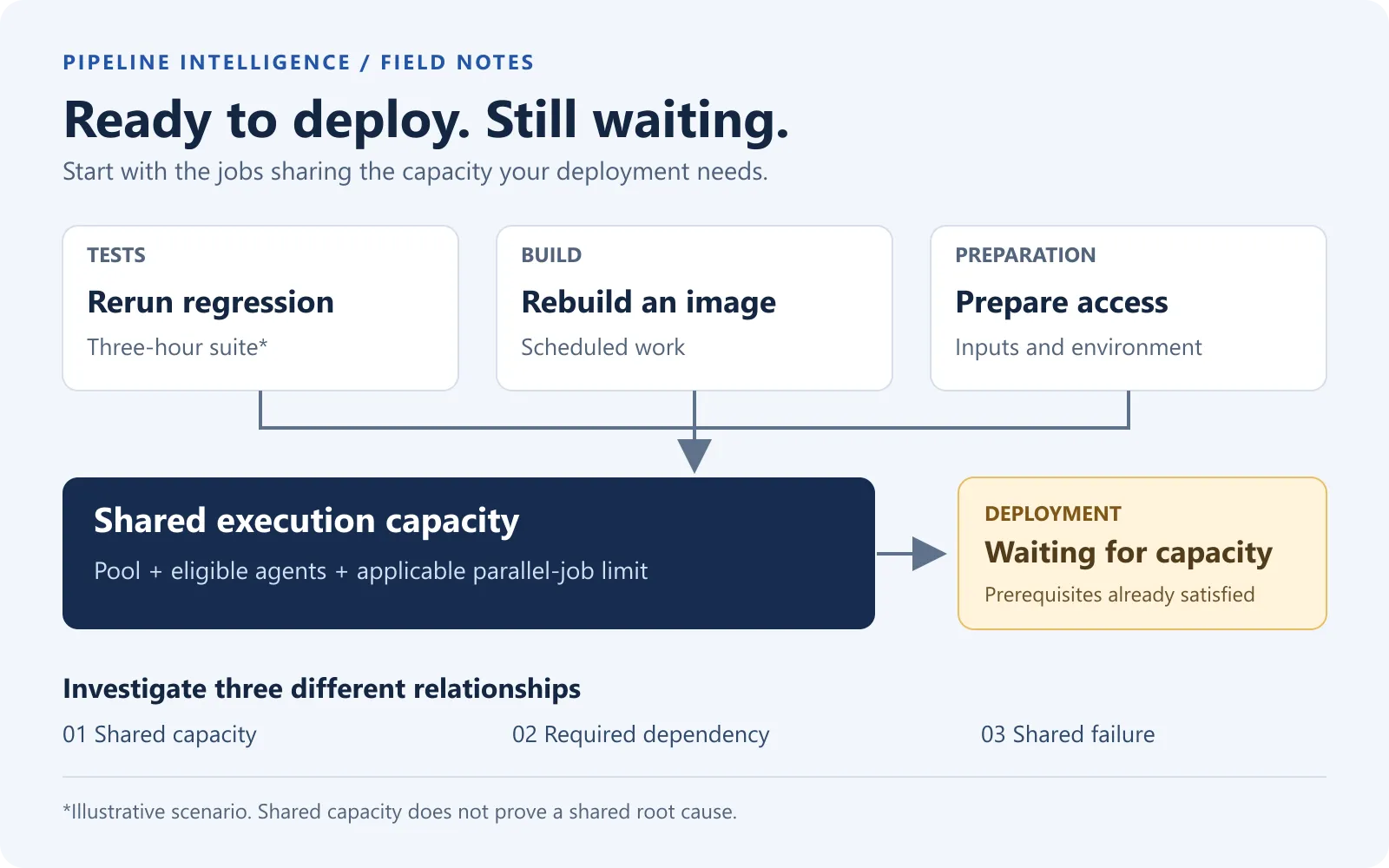
The release candidate is ready. The deployment has been requested. Nothing is deploying.
Someone opens the deployment pipeline and finds a waiting job. Another team is rerunning a three-hour test suite. A scheduled image build is using the same pool. A preparation pipeline also runs every morning, although nobody in the release call can explain which of its outputs this deployment needs.
This is an illustrative scenario, not a measured customer incident. Its useful detail is the relationship between the jobs: the pipeline waiting to deploy may be perfectly healthy. The delay belongs to the wider delivery system.
For a DevOps engineer, the task is to find the actual dependency or capacity constraint. For an engineering manager, it is to decide which work deserves scarce execution time and which uncertainty must be resolved before release.
First distinguish work that has not started from work that has not been triggered
“The pipeline will not start” can describe several different problems. There might be no run because a trigger did not match. A stage might be waiting for a dependency, approval, or resource check. An eligible job might be waiting for an agent. Or the job may already be running a long preparation step before the first visible deployment task.
Write down the exact run, stage, and job before changing anything. A queue problem and a missing trigger need different fixes. Giving a pipeline more agents cannot repair a condition that never creates the job.
For the opening scenario, assume a deployment run exists, its prerequisites are met, and its job is waiting for capacity. Now the question becomes: what is using that capacity, and why?
Three red pipelines can mean three different things
Start with a small map of the affected work, including pipelines outside the project where the delay was reported.
| Relationship | Evidence to look for | What it changes |
|---|---|---|
| Shared failure | Matching failed operation, dependency and time interval | Investigate the shared service or configuration before fixing each pipeline separately |
| Shared capacity | Overlapping job intervals, the same eligible pool and applicable concurrency limit | Review which jobs occupy the capacity the deployment needs |
| Explicit dependency | A downstream run requires an upstream artifact, result or completion | Find the prerequisite on the release path and verify its exact version |
Similar error text is a clue, not proof of a common root cause. Likewise, two jobs running at the same time do not prove that one blocked the other. They must compete for the relevant capacity or depend on each other. Record unknown relationships as unknown.
The map should include the pool, required agent capabilities, trigger, owner, inputs, outputs and downstream consumer. Do not record credential values. “Fetch deployment configuration” describes a dependency; a copied access token does not belong in the map.
Azure already provides useful evidence
Azure Pipelines has native analytics for pass rate, failures and duration, including task-level investigation and branch/date filters. Start with the pipeline reports and the exact run timeline. These already answer many questions about an individual pipeline.
The pool consumption report adds historical queued/running jobs and concurrency or agent counts. It can include work across projects using the pool. Microsoft currently documents it as a preview requiring Project Collection Administrator membership; it is not a view every project contributor can open.
An online agent is not the whole capacity story. Check the applicable parallel-job limit as well as pool availability and whether the agent can actually run the job. Adding machines or dividing a suite into more jobs does not, by itself, remove every queue limit.
The investigation connects these views. Keep the same time window and explicitly note whether you are looking at all branches, a release branch, or completed default-branch runs. A count from one population cannot silently become the denominator for another.
Follow the three-hour rerun back to the decision it serves
In the example, a long suite is running again because some tests failed. Before calling that work waste, establish what the failures mean. They could expose a real regression, an unstable test, a shared-environment collision, or failed preparation.
Then ask what the rerun must prove for this release:
- Does the entire suite need to run again, or is a smaller diagnostic rerun sufficient?
- Was equivalent evidence already collected for this exact artifact and relevant configuration?
- Which scenarios genuinely require the integrated deployment environment?
- Which checks could detect the same defect earlier, with fewer dependencies?
- If tests run in parallel, can their data and accounts remain independent?
A smaller diagnostic rerun is not automatically a replacement for the required release gate. Keep the first failure and every attempt visible. “It eventually passed” loses information about both reliability and consumed capacity.
Moving work earlier also has a condition: it must still apply to what will ship. Tests against yesterday’s image are not evidence for today’s rebuilt image merely because the branch name matches. Preserve the connection to the exact release candidate.
Review recurring work by purpose, not by its age in the repository
A scheduled pipeline can keep consuming resources long after its original purpose has changed. A weekly review can start with this short inventory:
| Work | A useful challenge | Boundary to preserve |
|---|---|---|
| Full regression every morning | Which changes or environment risks justify the full scope today? | Lower frequency increases the possible time to detection |
| Container image rebuild | Is an input, dependency or base image changing, and who consumes the output? | Reproducibility, patching and provenance |
| Certificate or credential maintenance | Is this an expiry check, rotation, or repeated retrieval? | Security policy and expiry margins; these are different operations |
| Artifact preparation | Do downstream jobs need this exact output, or are they downloading an unnecessary bundle? | Exact producer run and required contents |
| Environment preparation | Can a verified precondition be checked once for this execution? | Freshness, isolation and recovery after a failed check |
Do not simply disable certificate jobs or run security maintenance less often to improve a duration chart. First identify the control, owner and failure consequence. The useful change might be a lightweight expiry check, a narrower download, or moving expensive work outside a release peak while keeping the required deadline.
For Azure schedules, inspect both the YAML and the pipeline UI. UI schedules can override
YAML schedules; YAML cron uses UTC; always and batch interact. In particular,
always: true can allow scheduled runs despite batch: true. Verify the actual behavior
before relying on an overlap guard. See
scheduled trigger rules.
Running something less often is a risk decision. Define the maximum acceptable age of its result, the events that should force a fresh run, and the fallback when evidence is stale.
Look inside the non-test pipelines
Tests are easy to blame because their duration is visible. A build or preparation job can spend longer on checkout, dependency restoration, image layers, image scanning, pushing to a registry, downloading artifacts or waiting for another system.
For one slow run, rank its tasks by elapsed time and inspect the longest ones. Then check whether they sit on the path that actually delays the deployment. Summing all task times overstates elapsed delay when jobs overlap.
Two distinctions help:
A cache accelerates reproducible work. Measure cache restore and save time as well as the work avoided. A large cache can cost more than it saves; Microsoft’s caching guidance makes this tradeoff explicit. Credentials and authenticated browser sessions are not ordinary reusable dependency caches.
An artifact carries a specific output. If a downstream deployment needs a built package, preserve its producer run and identity. Download the required contents from the intended run rather than an unrelated latest success. Azure documents the available artifact publication and download paths.
Changing the container build strategy or the artifact contract deserves its own focused investigation. The first pass only needs to show where the time goes and who needs the output.
Choose one improvement with a measurable result
For the illustrative deployment, a useful review record would say:
| Record | Example question |
|---|---|
| Delayed decision | When could this exact release safely start deployment? |
| Confirmed constraint | Which eligible capacity was unavailable, for how long? |
| Proposed change | Narrow the justified gate, rebalance jobs, move a schedule, or add capacity? |
| Risk owner | Who accepts the changed timing or test selection? |
| Success measure | Did deployment wait decrease under a comparable workload? |
| Guardrail | Did missing results, failures or stale evidence increase? |
Measure elapsed time to usable evidence separately from total agent time. Parallel jobs can shorten a wait while increasing resource consumption. Neither number alone is a financial saving without a stated cost model.
This also creates a better management conversation. “We need more agents” becomes “these jobs overlap with release work; here is the required scope, the capacity constraint and the smallest change we can evaluate.”
Where Pipeline Intelligence fits
QaCockpit’s Pipeline Intelligence work brings pipeline activity, failure signals, queue and duration observations, and test-evidence completeness into one cross-project view. As of this article’s preparation on 6 October 2026, that module is in a private pilot; the public Marketplace installation must not be assumed to include it.
Such a view helps select the next run to inspect. It does not establish that one pipeline blocked another, calculate the correct test scope, or redesign an organization’s access model. Those conclusions still need the timeline, configuration and team context.
The current Azure DevOps edition organizes accessible pipeline and test evidence. Keep the distinction between a pipeline’s outcome and a complete test report.
The next useful deep dives are concrete: retry budgets and flaky-test ownership, shared agent capacity, schedule frequency, slow container builds, and artifact or identity handoffs. Each starts with the same question: which decision is waiting, and what evidence would actually unblock it?