
QaCockpit for Azure DevOps documentation
These guides cover the public Azure DevOps Marketplace extension, its current permissions, personal storage, evidence boundaries, and supported environment.
Looking for QaCockpit Cloud documentation?01
Give every evidence stream a stable identity
A UI suite, API suite, integration suite, or other pipeline-backed scope may each be a Test Source. The source connects business context with the exact Azure DevOps pipeline, execution, structured results, and diagnostics that support it.
One repository can contain several Test Sources, and one business project can depend on sources from several repositories or Azure DevOps projects.
02
Select only discovered, authorized resources
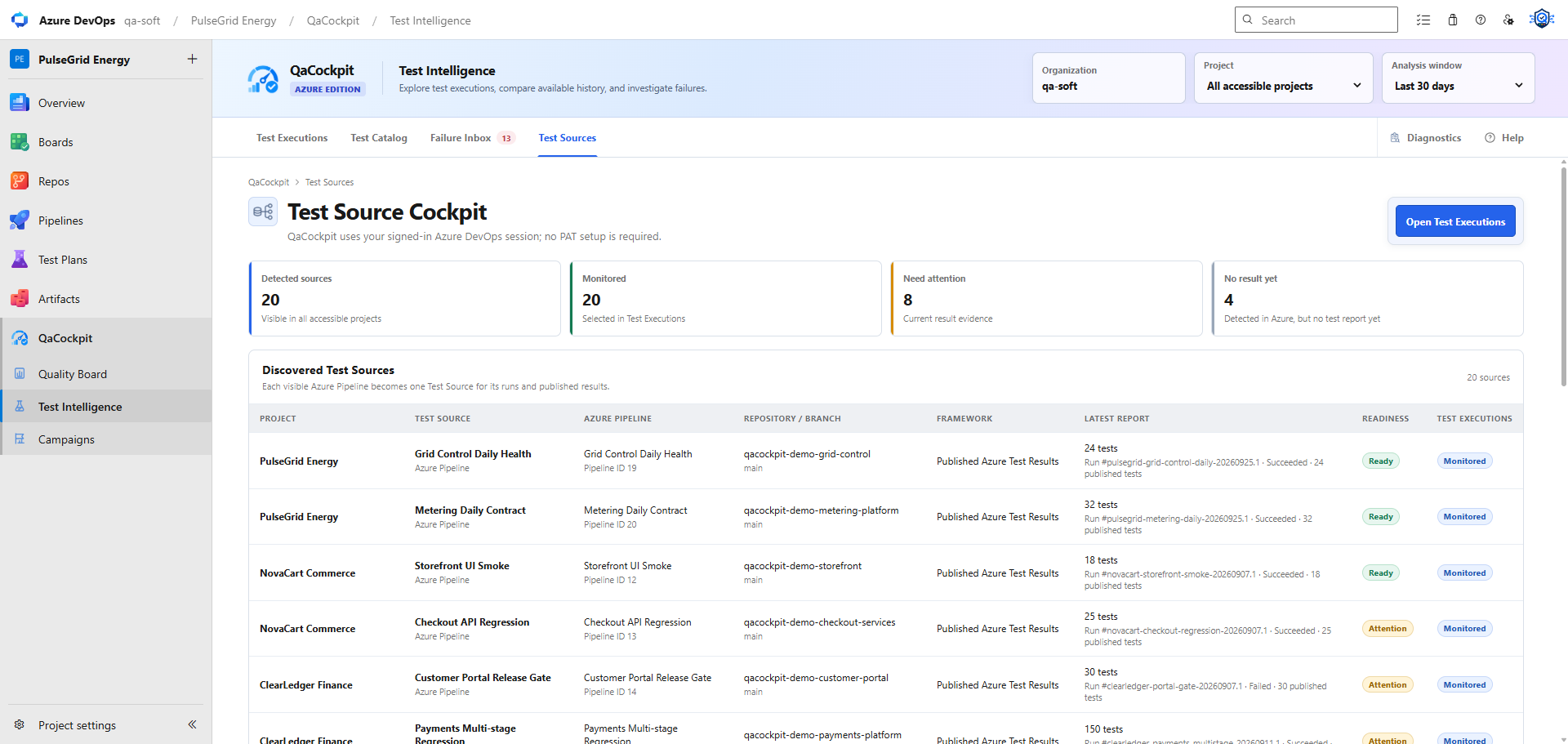
QaCockpit discovers visible Azure Pipelines. Select the sources to monitor; the selected Analysis window controls the run history used by the quality views.
A source identifies an Azure Pipeline. My campaigns can combine sources from accessible projects within the same organization. Selecting a source does not start its pipeline.
03
Verify what makes a source complete
- Stable pipeline/source identity and authorized project context.
- Exact run, branch, commit, and attempt correlation.
- Structured test identity, outcome, duration, and failure detail.
- Source-report completeness, without assuming an expected-test baseline exists.
- Missing/partial evidence state when the required report is unavailable.
- Safe links to diagnostics retained by the supported ingestion path.